
Have you ever wished your Nissan Rogue could help you relax more during long drives? Setting cruise control is the perfect way to do just that.
It keeps your speed steady, reduces fatigue, and lets you focus on the road ahead. If you’re unsure how to set cruise control in your Nissan Rogue, don’t worry—you’re in the right place. This guide will walk you through simple, clear steps so you can enjoy smoother, safer trips every time you get behind the wheel.
Keep reading and take control of your drive like a pro!
Locate The Cruise Control Switch
The cruise control switch is usually found on the steering wheel or nearby. It allows you to turn the system on and set your speed. Look for buttons labeled “ON/OFF” or “SET” to start using cruise control.
Understanding The Cruise Control Switch Location
The cruise control switch in a Nissan Rogue is easy to find. It helps keep a steady speed without using the gas pedal. Knowing where it is makes driving more relaxed on highways.
Usually, the switch is on the steering wheel or near it. This spot lets the driver reach it without taking hands off the wheel. Safety first, always.
Finding The Switch On The Steering Wheel
Check the right side of the steering wheel. Look for buttons or a small lever. The switch often shows a speedometer icon or the word “CRUISE”.
Pressing this switch turns cruise control on or off. Some models have separate buttons to set or cancel the speed.
Checking The Dashboard Indicators
Once you find the switch, turn it on. Look at the dashboard for a green or white light. This light tells you cruise control is ready to use.
If no light appears, the switch might be off or the system is not active. Try pressing the switch again or check your vehicle’s manual.
Turn On The Cruise Control System
The first step to using cruise control in your Nissan Rogue is turning on the system. This feature helps keep a steady speed without pressing the gas pedal. It makes driving on highways easier and more relaxing.
Turning on cruise control is simple. It only takes a moment and prepares the car to hold your chosen speed. Understanding how to activate it ensures safe and smooth use.
Locate The Cruise Control Button
Find the cruise control button on the steering wheel. It usually has a small speedometer icon or the word “CRUISE”. This button starts the system and gets it ready for use.
Press The Cruise Control Button
Press the button once. A light on the dashboard will come on. This light shows the system is active and waiting for you to set a speed.
Check The Dashboard Indicator
Look at your dashboard for the cruise control symbol. It confirms the system is on. If the symbol is off, the system is not active yet.
Accelerate To Desired Speed
Accelerating to the desired speed is the key step before setting cruise control in your Nissan Rogue. You need to reach the speed at which you want the car to maintain itself. This makes driving easier and more comfortable on long trips or highways.
It’s important to accelerate smoothly. Sudden speed changes can make the cruise control system work harder. Taking your time helps the system keep a steady speed without jerks or surprises.
Press The Accelerator Gently
Use the gas pedal to increase your speed gradually. Avoid pushing the pedal too fast. Slow and steady acceleration helps you reach the right speed comfortably. Watch your speedometer to know when you hit your target speed.
Keep An Eye On The Speedometer
Focus on the speedometer to track your current speed. Cruise control locks in the speed shown here. Make sure you reach the exact speed you want before setting it. Staying aware helps you avoid speeding or driving too slow.
Maintain A Steady Speed
Once near your desired speed, try to keep it steady. Avoid small speed bumps or slowdowns. Smooth speed makes the cruise control activation easier and safer. Your Nissan Rogue can then hold this speed without extra effort.
Credit: journal.classiccars.com
Activate Cruise Control
Activating cruise control in your Nissan Rogue helps maintain a steady speed on highways. It reduces the need to keep your foot on the accelerator. This makes long drives more comfortable and less tiring.
Before activating, ensure your vehicle is at a safe speed, usually above 25 mph. Keep your eyes on the road and hands near the steering wheel for safety.
Locate The Cruise Control Buttons
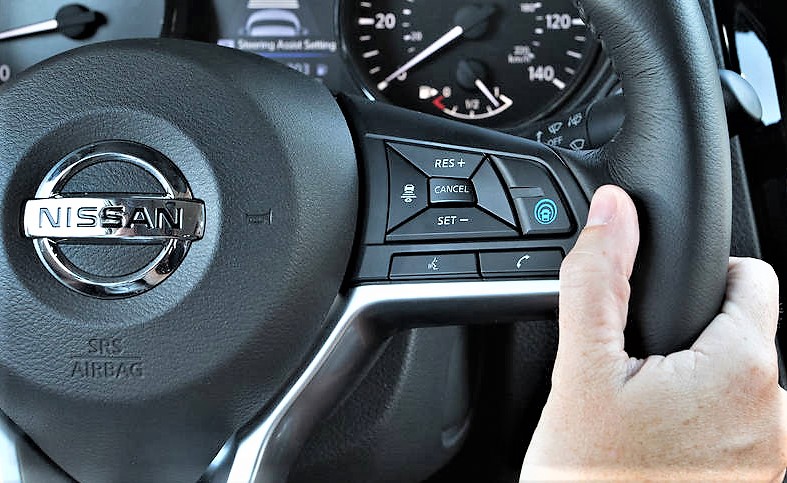
Find the cruise control buttons on the right side of the steering wheel. The main button often says “ON/OFF” or shows a speedometer icon. You need this button to start the system.
Press the “ON/OFF” button once. A light will appear on the dashboard to show cruise control is ready. The system is now active but not yet set to a speed.
Set Your Desired Speed
Accelerate to your preferred speed. Press the “SET” button on the steering wheel. The car will hold this speed automatically. You can now take your foot off the accelerator.
Adjust The Speed
Use the “RES +” button to increase speed slightly. Use the “SET -” button to decrease speed. Each press changes speed by about 1 mph. Hold the button for faster change.
Adjusting Speed While Cruise Control Is On
Adjusting speed while cruise control is on helps keep a safe and steady pace. It lets you change your speed without using the gas pedal. This feature is useful on highways and long drives.
You can increase or decrease the speed easily by using the controls on the steering wheel. These controls give you smooth speed changes without disrupting your drive.
Increase Speed
To increase speed, press the “+” button on the cruise control switch. Each press raises the speed by 1 mph or 1 km/h. Hold the button to increase speed continuously. Release when you reach the desired speed.
The car will smoothly accelerate to the new speed. This helps you pass slower vehicles or adjust to faster traffic.
Decrease Speed
To reduce speed, press the “-” button on the cruise control switch. Each press lowers the speed by 1 mph or 1 km/h. Hold the button to slow down gradually. Stop pressing when you reach a comfortable speed.
This feature helps you stay within speed limits and drive safely on winding roads.
Temporarily Cancel Cruise Control
Temporarily canceling cruise control in your Nissan Rogue allows quick control changes. It helps you slow down or stop without turning off the system. You can resume cruising later at the same speed. This feature adds safety and ease during driving.
Using Brake Or Clutch
Press the brake pedal gently to cancel cruise control immediately. This action tells the system to pause speed control. In manual models, pressing the clutch pedal also cancels cruise control. Both pedals give you full control over the vehicle.
Releasing the brake or clutch does not resume cruise control automatically. You must reactivate the system when ready.
Using Cancel Button
Your Nissan Rogue has a cancel button on the steering wheel. Press it once to pause cruise control without braking. This option keeps your speed ready to resume quickly.
Use the cancel button for smooth, gentle stopping. It is useful in light traffic or slow turns. The system stays active but paused until you press the resume button.
Resume Previously Set Speed
The “Resume Previously Set Speed” feature in the Nissan Rogue helps drivers return to a saved speed easily. This feature is useful after braking or canceling cruise control. It saves time and keeps the driving smooth.
Using this function is simple and adds comfort on long drives. It lets you continue at the same speed without resetting everything. Understanding how to use it improves your driving experience.
Locate The Resume Button On The Steering Wheel
Look for the cruise control buttons on the right side of the steering wheel. The “Resume” button usually has the word “RES” or a similar icon. Knowing this location helps you quickly react while driving.
Press The Resume Button To Reactivate Speed
After braking or pausing cruise control, press the “Resume” button. The car will speed up to the last set speed automatically. This makes it easier to keep a steady pace on highways.
Check Your Speed Before Resuming
Always check the road and traffic before resuming the speed. Ensure it is safe to accelerate to the saved speed. Safety should be your top priority while using cruise control.

Credit: www.youtube.com
Turn Off Cruise Control
Turning off cruise control in your Nissan Rogue is simple and quick. Knowing how to do this helps you stay safe and in control of your vehicle. You can turn off cruise control anytime you need to slow down or stop using your own speed.
Use the controls on your steering wheel or brake pedal to deactivate the system. This lets you switch back to manual driving without delay.
Using The Cancel Button
Press the cancel button on the steering wheel. This stops cruise control but keeps the speed setting saved. You can resume it later without resetting the speed.
Pressing The Brake Pedal
Step on the brake pedal gently. This turns off cruise control immediately. It is the safest way to deactivate while driving.
Switching Off The Main Cruise Control
Turn the cruise control switch to the off position. This clears the saved speed and turns off the system completely. Use this when you no longer want cruise control active.
Safety Tips When Using Cruise Control
Using cruise control in your Nissan Rogue can make driving easier on long trips. It keeps your speed steady without pressing the gas pedal. Still, safety must be your top priority when using this feature. Follow these safety tips to stay in control and drive safely.
Keep Your Hands On The Wheel
Even with cruise control on, always keep your hands on the steering wheel. This helps you react quickly to any road changes. Do not let your hands rest away from the wheel for long.
Stay Alert At All Times
Do not let cruise control make you less focused. Watch the road and traffic around you carefully. Be ready to brake or steer if needed.
Use Cruise Control Only On Highways
Set cruise control only on highways or open roads. Avoid using it in heavy traffic, city streets, or bad weather. These conditions need constant speed and control changes.
Check Your Speed Settings
Set a safe and legal speed before activating cruise control. Do not go too fast. Adjust the speed if road or traffic conditions change.
Be Ready To Cancel Cruise Control
Know how to turn off cruise control quickly. Tap the brake or press the cancel button to stop it. Always be prepared to take full control of the car.

Credit: www.reddit.com
Frequently Asked Questions
How Do I Activate Cruise Control In A Nissan Rogue?
Press the “ON/OFF” button on the steering wheel to activate cruise control.
How To Set The Desired Speed In Nissan Rogue Cruise Control?
Accelerate to the speed you want, then press the “SET” button on the steering wheel.
Can I Adjust The Cruise Control Speed While Driving?
Yes, use the “RES+” button to increase and “SET-” to decrease speed.
How Do I Cancel Cruise Control In My Nissan Rogue?
Press the “CANCEL” button or tap the brake pedal to cancel cruise control.
Is Cruise Control Safe To Use In Traffic Or Bad Weather?
No. Avoid using cruise control in heavy traffic or bad weather for safety.
Does Nissan Rogue Have Adaptive Cruise Control Features?
Some models include adaptive cruise control, which adjusts speed based on traffic ahead.
Conclusion
Setting cruise control in your Nissan Rogue makes driving easier and safer. It helps keep your speed steady on highways. Remember to press the cruise control button first. Then set your desired speed using the controls on the steering wheel.
Always stay alert and be ready to brake if needed. Practicing in a safe area can build your confidence. Enjoy smoother drives with less foot fatigue. Use cruise control wisely to improve your driving experience. Keep safety as your top priority at all times.
As an Amazon Associate, I earn from qualifying purchases

