
Is your Nissan Rogue radio acting up or refusing to turn on? You’re not alone, and the good news is that resetting it can often fix the problem quickly.
Whether you’re dealing with frozen screens, lost settings, or connection issues, knowing how to reset your Nissan Rogue radio can save you time and frustration. You’ll find simple, step-by-step instructions to get your radio back to working perfectly. Keep reading, and you’ll be back to enjoying your favorite music and radio stations in no time.
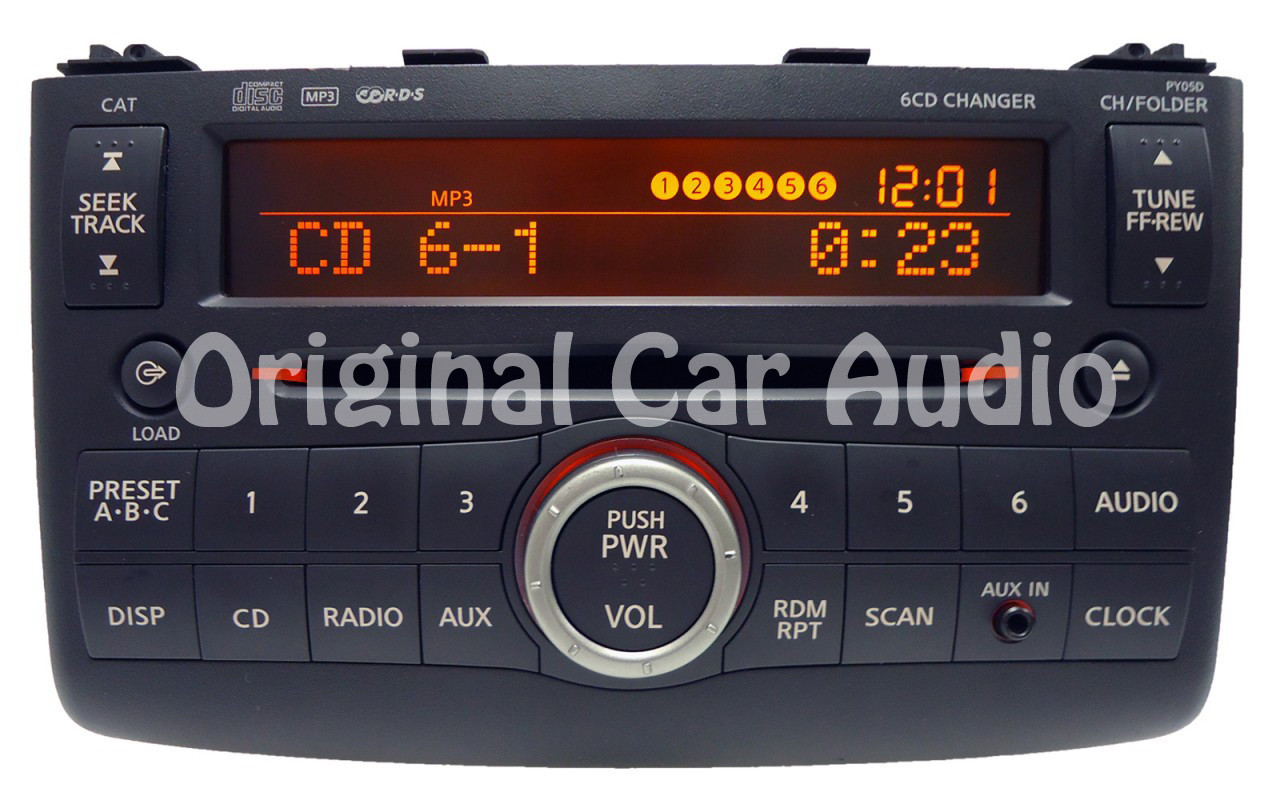
Credit: www.cd4car.com
Why Reset Your Nissan Rogue Radio
Resetting your Nissan Rogue radio can solve many common problems. It refreshes the system and clears minor glitches. This simple step helps restore the radio’s normal function. Resetting can improve sound quality and fix connection issues. It also helps when the radio freezes or stops responding.
Understanding why to reset your radio helps you decide when to try it. It saves time and often avoids costly repairs. Knowing the reasons makes troubleshooting easier and faster.
Fixing Audio And Display Problems
Sometimes the radio sound cuts out or becomes distorted. The screen may flicker or show errors. Resetting the radio often clears these issues. It resets the software to default and removes errors.
Restoring Bluetooth And Connectivity
Bluetooth may fail to connect or drop frequently. Resetting the radio can restore Bluetooth functions. It helps the system find and pair devices again. This makes phone calls and music streaming reliable.
Clearing System Freezes Or Crashes
The radio may freeze or stop responding suddenly. A reset forces the system to restart. This clears the freeze and restores control. It prevents frustration while driving.
Updating After Software Changes
Software updates may cause glitches or reset settings. Resetting the radio helps the system adapt to changes. It ensures all functions work smoothly after updates.
When To Reset The Radio
Knowing when to reset your Nissan Rogue radio helps keep it working well. The radio may need a reset for different reasons. Resetting can fix small problems fast.
Here are some signs that tell you it is time to reset your radio.
Radio Not Turning On
The radio screen stays black or blank. Pressing buttons does nothing. This problem means the system may be frozen. A reset can often bring it back to life.
Sound Issues
Sound cuts out or is very low even with volume up. Distorted or static sounds come from the speakers. These problems show the radio is not working right. Resetting can clear the error.
Frozen Screen Or Controls
The touchscreen or buttons stop responding. You cannot change stations or settings. The system may be stuck. A reset usually fixes this issue quickly.
Bluetooth Or Connectivity Problems
Bluetooth does not connect to your phone. Calls drop or music won’t play. The radio’s connection software can get stuck. Resetting the radio helps restore proper links.
Error Messages
Error codes or messages appear on the screen. They often point to system glitches. Resetting the radio can clear these messages and restart the system.
Tools Needed For Reset
Resetting the Nissan Rogue radio requires a few simple tools. These tools help you access the radio system safely. Having the right tools ready saves time and avoids damage.
The tools are easy to find. Most people already have them at home. Using the correct tools makes the reset process smooth and quick.
Small Flathead Screwdriver
A small flathead screwdriver helps remove panels or covers. It fits into tight spaces without scratching surfaces. This tool is perfect for gently prying off the radio trim.
Paperclip Or Radio Code Tool
A straightened paperclip or a special radio code tool is needed to press tiny reset buttons. These buttons are often hidden and require a slim object to reach them.
Owner’s Manual
The owner’s manual contains important information and codes. It guides you through the reset steps and provides the radio code. Keep it handy during the reset process.
Battery Terminal Wrench
A wrench helps disconnect the car battery if a hard reset is needed. Disconnecting the battery resets the entire electrical system, including the radio.
Resetting The Radio Using The Reset Button
Press the reset button on the Nissan Rogue radio to restore its settings. This clears errors and fixes common issues quickly. Find the small reset button near the radio display and press it gently with a pointed object.
Locating The Reset Button
The reset button on a Nissan Rogue radio is small and often hidden. It is usually inside the radio faceplate or near the CD slot. Use a pointed tool like a pen or paperclip to press it. Finding this button is the first step to reset the radio quickly.
Preparing To Reset The Radio
Turn off the car engine before pressing the reset button. This prevents any electrical issues during reset. Make sure the radio display is on but unresponsive. Pressing the reset button now will clear any glitches and restore factory settings.
Pressing And Holding The Reset Button
Insert the tool gently into the reset button hole. Press and hold it for about 5 seconds. The radio screen may flash or go blank during this time. Release the button once the display changes, signaling the reset is complete.
Verifying The Reset Success
Turn the radio off and on again to check the reset. The radio should start without errors or frozen screens. You may need to re-enter the radio code if prompted. This confirms the reset button method worked properly.
Resetting Through The Radio Menu
Resetting the Nissan Rogue radio through the menu is a simple way to fix common issues. This method helps clear errors and restore settings without extra tools. The process uses the built-in options on the radio screen.
This approach is perfect for those who want a quick reset. It does not erase saved stations or preferences. Follow the steps below to reset your radio safely.
Accessing The Radio Settings
Start by turning on the radio system in your Nissan Rogue. Look for the “Settings” or “Setup” button on the dashboard or touchscreen. Press this button to open the menu where you can change radio options.
Finding The Reset Option
Scroll through the menu using the dial or touchscreen. Locate the “System” or “Factory Reset” section. This option is usually at the bottom of the settings list. Select it to continue with the reset process.
Confirming The Reset
The system will ask you to confirm the reset. Choose “Yes” or “Confirm” to proceed. The radio will then reset and restart automatically. After that, the radio should work smoothly again.

Credit: www.youtube.com
Resetting By Disconnecting The Battery
Resetting your Nissan Rogue radio by disconnecting the battery is a simple and effective method. This process clears the radio’s memory and often fixes problems like frozen screens or no sound. It works by cutting power to the entire electrical system, forcing the radio to restart fresh.
This method requires only basic tools and a little patience. It is a good option if other reset methods fail. Be careful and follow the safety steps to avoid damage or injury.
Preparation Before Disconnecting The Battery
Turn off the Nissan Rogue completely. Remove the key from the ignition. Gather tools like a wrench or socket set. Wear gloves to protect your hands. Make sure you know your radio code. This code is necessary to reactivate the radio after the reset.
Steps To Disconnect The Battery Safely
Locate the battery under the hood. Identify the negative terminal marked with a minus (-) sign. Use the wrench to loosen the negative terminal clamp. Carefully remove the clamp from the battery post. Avoid touching both terminals at the same time. Leave the battery disconnected for at least 10 minutes. This time lets the radio’s memory fully clear.
Reconnecting The Battery And Restarting The Radio
Place the negative terminal clamp back on the battery post. Tighten the clamp securely with the wrench. Close the hood of your Nissan Rogue. Turn the ignition to the accessory position. Enter your radio code when prompted. Your radio should now reset and work properly.
Troubleshooting Common Radio Issues
Radio problems in a Nissan Rogue can be frustrating. They stop you from enjoying music or hearing important updates. Understanding common radio issues helps solve them fast. This saves time and avoids trips to the mechanic.
Many radio problems are simple and fixable. Some need a quick reset. Others require checking the connections or settings. This section covers common issues and how to troubleshoot them.
Radio Not Turning On
Check if the car’s ignition is on. The radio needs power from the battery. Make sure the fuse is not blown. A blown fuse stops power flow to the radio. Replace it if needed. Also, check the radio’s power button.
No Sound Or Low Volume
Volume might be set too low or muted. Increase the volume and unmute if needed. Inspect speaker wires for damage or loose connections. Faulty wiring can cause no sound. Adjust balance and fade settings to ensure sound reaches all speakers.
Radio Display Is Blank
A blank screen can mean a power issue. Reset the radio by turning off the car and restarting it. Check the brightness settings on the radio display. A very low brightness setting may make the screen look blank.
Radio Locked Or Asking For Code
The radio locks after losing power to prevent theft. Enter the correct security code to unlock it. Find the code in the car’s manual or contact the dealer. Avoid multiple wrong attempts, which may lock the radio further.
Credit: www.reddit.com
Preventing Future Radio Problems
Preventing future radio problems in your Nissan Rogue helps keep your drives smooth. Simple habits protect your radio from damage and save you time.
Regular care avoids many common radio issues. Follow easy steps to keep your system working well.
Keep The Battery Healthy
A weak battery can cause the radio to lose settings or stop working. Check your battery regularly. Replace it if it shows signs of weakness. A strong battery supports stable radio performance.
Avoid Sudden Power Loss
Turning off the car without letting the radio shut down can cause errors. Always turn off the radio before switching off the engine. This prevents glitches and resets.
Protect Against Moisture
Water and moisture damage the radio system. Keep the interior dry, especially during rain or snow. Use floor mats and avoid spills near the dashboard.
Use The Radio Controls Gently
Press buttons and knobs softly. Rough handling can break parts inside the radio. Smooth use prolongs the radio’s life and prevents malfunctions.
Update Software When Possible
Check for software updates for your Nissan Rogue radio. Updates fix bugs and improve features. Visit your dealer or official website for guidance.
Frequently Asked Questions
How Do I Reset The Nissan Rogue Radio System?
Press and hold the power button and the volume knob together for about 10 seconds until the system restarts.
Why Is My Nissan Rogue Radio Not Working After Reset?
Check the car battery and fuses. Reset may need a second try if power issues persist.
Can I Reset My Nissan Rogue Radio Without Losing Saved Stations?
Yes, a soft reset usually keeps saved stations intact, but a full factory reset will erase them.
What Should I Do If The Nissan Rogue Radio Screen Freezes?
Turn off the car, wait a few minutes, then restart the system to unfreeze the screen.
How Often Should I Reset My Nissan Rogue Radio?
Reset only when the radio malfunctions or freezes to avoid unnecessary disruptions.
Will Resetting The Nissan Rogue Radio Fix Bluetooth Connection Issues?
Resetting can help fix Bluetooth problems by refreshing the radio’s system and settings.
Conclusion
Resetting your Nissan Rogue radio is simple and quick. Follow the steps carefully to avoid mistakes. This process can fix many radio issues. Keep your radio code handy before starting. A reset helps restore factory settings and clears errors. Enjoy better sound and control after the reset.
Regular care of your car’s electronics saves time later. Try these tips next time your radio acts up. Easy fixes like this keep your drive smooth.
As an Amazon Associate, I earn from qualifying purchases

