
Imagine stepping into your Nissan on a chilly morning and feeling the warmth already waiting for you. Sounds great, right?
Learning how to remote start your Nissan can make this a reality. It’s simple, quick, and adds a whole new level of convenience to your daily routine. In this guide, you’ll discover exactly how to use this feature so your car is ready to go before you even reach the door.
Keep reading, and you’ll never have to wait in a cold or hot car again.
Credit: accessorides.com
Remote Start Benefits
Remote start technology offers many benefits for Nissan owners. It improves daily driving comfort and adds safety. This feature allows you to start your car’s engine from a distance. You can prepare your vehicle before getting inside. It makes your driving experience smoother and more enjoyable.
Comfort In Extreme Weather
Remote start helps you beat harsh weather. Start your Nissan from inside your home or office. Warm up the engine and heat the cabin in cold weather. Cool down the car and run the air conditioner on hot days. Step inside a comfortable car, no matter the season.
Convenience And Time-saving
Save time by starting your car remotely. No need to wait outside for the engine to warm up. Start your Nissan while finishing your morning routine or packing your bags. This small time saver adds up and makes your day easier.
Enhanced Vehicle Security
Remote start increases your car’s safety. The engine runs only with the key fob nearby. It prevents theft and unauthorized use. Some systems alert you if the car is moved or tampered with. Feel more secure leaving your Nissan parked anywhere.

Credit: www.youtube.com
Check Nissan Compatibility
Before trying to remote start your Nissan, check if your model supports this feature. Not all Nissan vehicles come with remote start from the factory. Some require extra parts or devices. Knowing your car’s compatibility saves time and effort.
Checking compatibility helps you choose the right remote start option. It also ensures your vehicle stays safe and works well. Start by finding out if your Nissan has factory remote start or if you need an aftermarket system.
Models With Factory Remote Start
Many Nissan models offer factory remote start. Usually, newer cars from 2015 and later include this feature. Popular models like the Nissan Altima, Rogue, and Sentra often have it. Check your owner’s manual or Nissan website to confirm. Factory remote start works smoothly with your car’s system.
Aftermarket Remote Start Options
If your Nissan lacks factory remote start, aftermarket kits can help. These kits add remote start to older or basic models. Choose a kit compatible with your car’s make and model. Professional installation is important to avoid damage. Aftermarket systems may offer extra features like smartphone control.
Key Fob Features
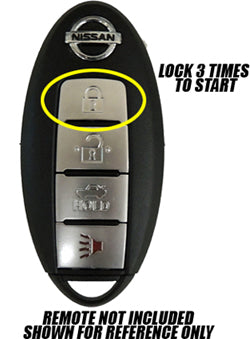
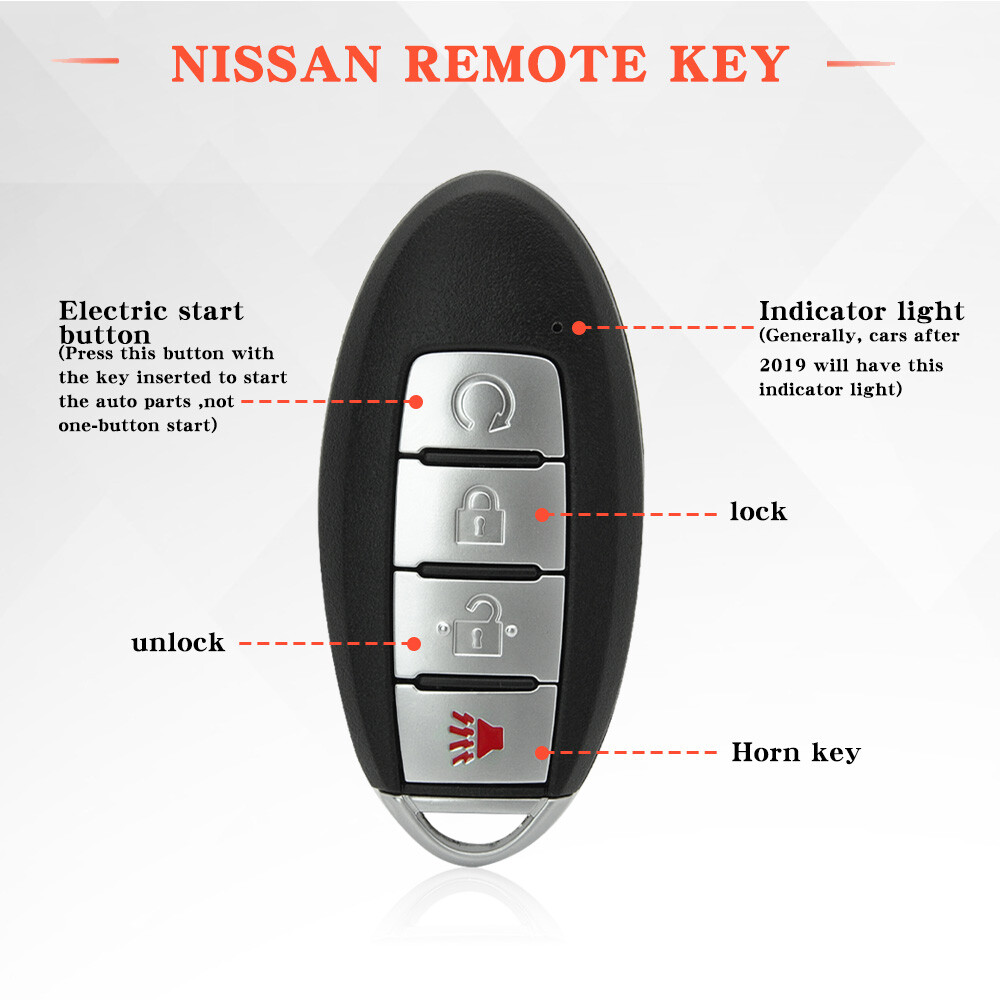
Your Nissan key fob shows if remote start is available. Look for a button with a circular arrow or “start” icon. Key fobs with remote start often have a longer range. Some models require pressing the lock button twice before remote start. If your key fob lacks this button, remote start might not be supported.
Prepare Your Vehicle
Preparing your Nissan for remote start is important. It makes the process safe and smooth. Taking a few steps before starting helps avoid problems. Check your vehicle carefully before using remote start.
Ensure Doors And Hood Are Closed
Make sure all doors are fully closed. The hood must be shut tight too. Remote start won’t work if any door or hood is open. This stops the engine from running if the car is not secure.
Verify Battery Health
Your car’s battery must be in good condition. A weak battery might fail to start the engine remotely. Check the battery regularly and replace it if needed. A strong battery ensures reliable remote start every time.
Parking Brake Requirements
Always engage the parking brake before remote starting your Nissan. This keeps the car from moving unexpectedly. Some models require the parking brake to be on for remote start to activate. It is a safety rule to follow.
Credit: www.ebay.com
Using Nissan Factory Remote Start
Using the Nissan factory remote start feature is a simple way to warm up or cool down your vehicle before you get in. This feature works with your Nissan key fob and lets you start the engine from a distance. It is designed for comfort and convenience, especially in extreme weather.
The factory remote start keeps your Nissan secure while operating. It follows safety rules to avoid any accidents. The process is quick and easy, and you can do it without any extra tools or apps.
Step-by-step Key Fob Instructions
First, lock your Nissan by pressing the lock button on the key fob. Next, press the remote start button twice within three seconds. You will see the parking lights flash, which means the engine has started. The vehicle will run for about 10 minutes before it shuts off automatically. To turn off the engine, press the remote start button once. Always make sure your car is parked in a safe place before using remote start.
Indicator Lights And Sounds
The parking lights flash to show the remote start is active. You will hear the engine turn on and run. If the engine does not start, the lights will not flash. Some Nissan models beep twice when the engine starts and once when it stops. These signals help you know the status of your remote start easily.
Limitations And Safety Features
The remote start will not work if the hood is open or the key is in the ignition. It also will not start if the doors are unlocked. The system stops the engine if the brake pedal is pressed or the driver’s door opens. This prevents accidents and keeps the vehicle safe. The remote start runs for a limited time to avoid wasting fuel.
Aftermarket Remote Start Setup
Adding an aftermarket remote start system to your Nissan can bring great convenience. It lets you start your car from a distance. This means your car can warm up or cool down before you get inside. Setting up this system requires some care and knowledge. Choosing the right system, installing it properly, and programming the remote are key steps.
Choosing A Reliable System
Choose a remote start system that fits your Nissan model. Check for compatibility with your car’s electronics. Look for systems with good reviews and solid warranties. Avoid cheap options that may fail or cause problems. A reliable system ensures safety and long-term use.
Professional Installation Tips
Installation is a delicate process. It involves wiring the system to your car’s ignition and security. Find a professional installer with experience in Nissan vehicles. Proper installation avoids damage to your car’s electronics. It also keeps your warranty intact and prevents errors.
Programming The Remote
Programming the remote is the final step. Follow the instructions that come with the system carefully. Some systems allow easy self-programming. Others may require a professional to sync the remote with your car. Ensure the remote starts the car smoothly and locks or unlocks the doors.
Troubleshooting Remote Start Issues
Troubleshooting remote start issues in your Nissan can save time and frustration. Understanding common problems helps fix them quickly. Some issues are simple to solve, while others may need expert help. Follow easy steps to get your remote start working again.
Common Problems And Fixes
The remote start may not work if the key fob battery is weak. Replace the battery to restore function.
Check if the car doors or trunk are fully closed. The system prevents starting if any door is open.
Ensure the hood is properly latched. A loose hood stops the remote start for safety reasons.
The brake pedal must not be pressed during remote start. Pressing it disables the feature.
Resetting The System
Sometimes, resetting the remote start system solves connection problems. Start by turning off the car.
Remove the key fob battery for a minute, then put it back. This resets the fob.
Turn the ignition to the “on” position without starting the engine. Wait for a few seconds.
Turn the ignition off and try the remote start again. This process can clear minor errors.
When To Seek Professional Help
Call a Nissan technician if the remote start still fails after basic fixes. They can diagnose complex issues.
Problems with the car’s electrical system often need expert tools and knowledge.
Do not attempt to fix wiring or computer modules yourself. This can cause more damage.
Professional help ensures your remote start works safely and correctly.
Maximizing Remote Start Use
Using your Nissan’s remote start feature can save time and improve comfort. It lets you warm up or cool down your car before you enter. This section explains how to get the most from remote start. Follow these tips for better use every day.
Scheduling Remote Start Times
Set remote start to run at specific times. For example, start your car 10 minutes before leaving. This way, your car is ready when you are. Use your Nissan app or key fob to schedule starts. Avoid running remote start too long. Short sessions protect your car’s battery and engine.
Maintaining Vehicle Health
Remote start helps your engine warm up gently. This reduces wear and tear on parts. Use remote start regularly but not for hours. Long idle times can waste fuel and cause damage. Check your vehicle’s manual for recommended idle times. Keep your car’s battery in good shape. A weak battery may fail to start remotely.
Security Precautions
Always lock your car before using remote start. The engine runs, but doors stay locked. Do not leave valuables inside the car. Use remote start in safe locations only. Turn off remote start if you see anything suspicious. Follow Nissan’s safety advice to protect your vehicle and yourself.
Frequently Asked Questions
How Do I Activate Remote Start On My Nissan?
Press the lock button, then hold the remote start button for 3 seconds.
Which Nissan Models Support Remote Start?
Most Nissan models from 2013 and newer support remote start features.
Can I Use Remote Start In Cold Or Hot Weather?
Yes, remote start helps warm or cool your Nissan before driving.
Is Remote Start Safe To Use In Enclosed Spaces?
No, avoid using remote start in garages to prevent carbon monoxide risk.
How Far Can I Start My Nissan Remotely?
Remote start range varies but usually works within 300 feet.
What Should I Do If Remote Start Doesn’t Work?
Check the key fob battery and ensure the car is locked properly.
Conclusion
Remote starting your Nissan saves time and adds comfort. It helps warm or cool the car before you enter. Follow the steps carefully for best results. Always check your vehicle’s manual for specific instructions. Practice safety by using the remote start feature responsibly.
Now you can enjoy a more convenient driving experience. Try it today and feel the difference.
As an Amazon Associate, I earn from qualifying purchases

