
If you own a Nissan Leaf or are thinking about getting one, you’ve probably noticed those battery bars on the dashboard. But what do they really mean?
How many battery bars does your Nissan Leaf have, and how can understanding them help you get the most out of your electric car? Knowing this simple detail can save you from unexpected stops and keep your drives smooth and worry-free.
Keep reading to discover everything you need to know about your Nissan Leaf’s battery bars and why they matter for your daily trips.
Credit: mobility.lk
Nissan Leaf Battery Basics
The Nissan Leaf uses an electric battery to power the car. This battery stores energy for driving without gasoline. Knowing the battery basics helps understand how far the car can go. It also explains the number of battery bars shown inside the car.
The battery bars represent the charge left in the battery. Each bar shows a part of the total battery power. More bars mean more driving range. Fewer bars warn the driver to recharge soon.
Battery Capacity And Range
The Nissan Leaf battery capacity is measured in kilowatt-hours (kWh). Early models had a 24 kWh battery. Newer models offer 40 kWh or even 62 kWh options. A larger battery means the car can travel longer distances on one charge.
For example, a 40 kWh battery can drive about 150 miles. The 62 kWh battery increases the range to around 226 miles. Range varies with driving style, weather, and road conditions. The battery bars indicate how much charge remains to estimate this range.
Types Of Battery Cells
The Nissan Leaf uses lithium-ion battery cells. These cells store electrical energy efficiently. They are lightweight and last longer than older battery types.
Each battery pack contains many small cells combined. This design helps deliver steady power and improves safety. The battery management system monitors the health of these cells. It keeps the battery working well over time.
Battery Bar Indicator Explained
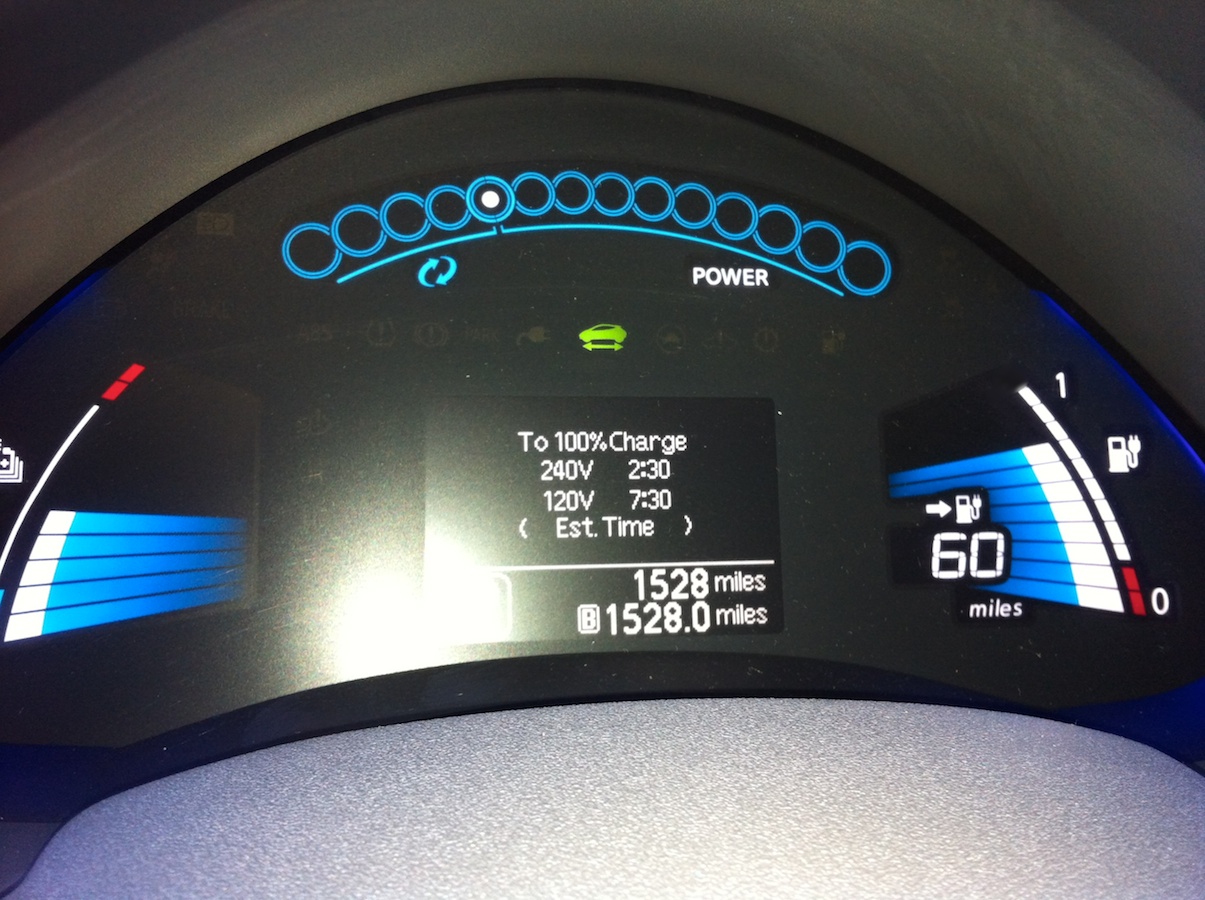
The Nissan Leaf features a battery bar indicator to show the battery’s charge level. This visual tool helps drivers understand how much power remains. The indicator is easy to read and gives a quick update on the battery status. It is important for planning trips and charging stops.
Number Of Battery Bars
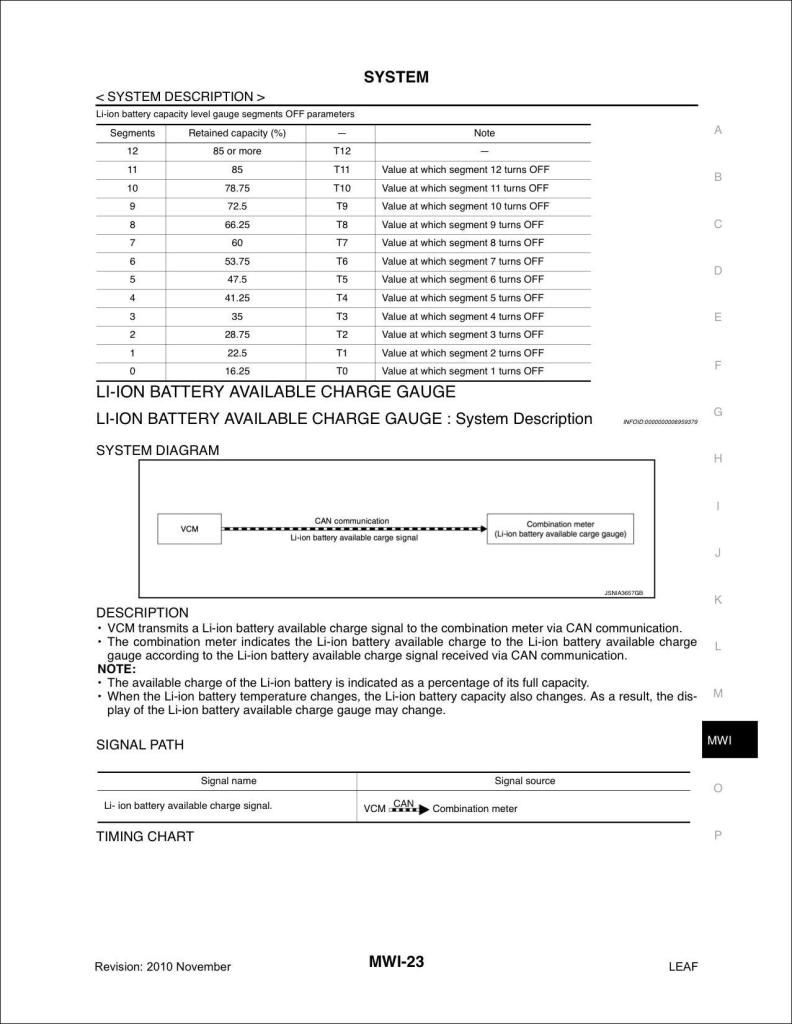
The Nissan Leaf battery indicator shows 12 bars in total. Each bar lights up to represent a portion of the battery charge. As the battery drains, the number of lit bars decreases. This clear display helps drivers see the battery level at a glance.
What Each Bar Represents
Each battery bar equals about 8.3% of the total battery charge. Full bars mean the battery is nearly full. Fewer bars indicate less charge remains. When only a few bars are left, the driver should plan to recharge soon. This system gives a simple way to track battery life during driving.
Interpreting Battery Bars
The battery bars on a Nissan Leaf show how much energy is left. These bars make it easy to check the battery at a glance. Understanding these bars helps drivers know when to charge. It also shows how far the car can go before stopping.
Each bar represents a part of the total battery charge. The bars fill up as the battery charges and empty as it uses power. Watching these bars helps avoid running out of power unexpectedly.
Full Charge Vs. Partial Charge
A full battery shows all bars lit up. This means the Nissan Leaf has maximum driving range. The car can travel the longest distance before needing a recharge. Partial charge shows fewer bars. It tells the driver the battery is not full yet. The fewer the bars, the less driving distance remains.
Partial bars still allow driving but with less range. Charging early is smart to avoid running low. Drivers can plan trips better by watching these bars closely.
Low Battery Warning
The Nissan Leaf alerts the driver when the battery is low. This warning appears before the bars completely disappear. It helps prevent the car from stopping on the road. The low battery warning is a signal to find a charging station soon.
Ignoring this warning can cause the car to lose power. Drivers should act quickly to recharge. The warning keeps the driver safe and the car ready to go.
Credit: www.greencarreports.com
Factors Affecting Battery Bars
The number of battery bars in a Nissan Leaf shows the battery’s current charge and health. Several factors affect how many bars appear on the display. These factors can change the battery’s performance and the number of bars shown.
Battery Age And Degradation
Over time, the battery in a Nissan Leaf loses some of its capacity. This process is called degradation. As the battery ages, fewer bars may show even when fully charged. The battery cannot hold as much energy as before. This means the car may drive shorter distances on a full charge. Regular use and charging cycles speed up this decline. Older batteries show fewer bars compared to new ones.
Temperature Impact
Temperature plays a big role in battery performance. Cold weather can reduce the battery’s ability to hold charge. The bars may drop faster in low temperatures. Warm weather also affects the battery but usually less than cold. Extreme heat can damage the battery and lower its life span. The car’s system adjusts the bars to reflect these temperature changes. This helps drivers understand the real battery condition.
Monitoring Battery Health
Monitoring the battery health of your Nissan Leaf is key to keeping your car running well. The battery bars show how much charge remains and help track battery condition over time. Regular checks can prevent surprises and extend the battery life.
There are easy ways to keep an eye on your battery health. You can use the Nissan Leaf app or watch the dashboard indicators. Both provide clear information about your battery’s status.
Using The Nissan Leaf App
The Nissan Leaf app gives real-time updates on your battery’s charge level. It shows the exact number of battery bars left. You can also see the battery’s health status and how far you can drive. The app sends alerts if the battery needs attention.
Checking the app is simple and fast. It helps plan trips better and avoid running out of power. The app works on your phone, so you can monitor the battery anytime.
Dashboard Indicators
Your Nissan Leaf’s dashboard displays battery bars clearly. Each bar represents a portion of the battery charge. The more bars, the higher the charge. When bars drop, it signals a need to recharge soon.
Besides bars, other symbols may show battery health issues. Warning lights alert you to problems like low battery temperature or reduced capacity. Understanding these indicators helps maintain your Leaf’s performance.

Credit: www.reddit.com
Maximizing Battery Lifespan
Maximizing the battery lifespan of your Nissan Leaf helps keep the car running longer. The battery is the heart of the electric vehicle. Taking care of it means better performance and fewer replacements. Small changes in how you charge and drive can make a big difference. Here are some tips to help you preserve your battery health over time.
Charging Best Practices
Charge your Nissan Leaf between 20% and 80% for better battery health. Avoid letting the battery fall to zero or stay at 100% for long. Use a Level 2 charger when possible for steady charging speed. Fast charging often heats the battery and can reduce its life. Plug in your car during cooler hours to prevent overheating. Always follow the car’s charging guidelines for safety and efficiency.
Driving Habits To Preserve Battery
Drive smoothly to avoid quick bursts of acceleration. Hard acceleration uses more battery power and creates heat. Use eco mode to limit power and save energy. Avoid driving at very high speeds for long periods. Stop-and-go traffic can drain the battery faster. Plan routes to minimize heavy traffic and hills. Small changes in driving style help keep the battery healthy longer.
Frequently Asked Questions
How Many Battery Bars Does A Nissan Leaf Have?
The Nissan Leaf shows 12 battery bars to indicate its charge level.
What Does Each Battery Bar Represent In Nissan Leaf?
Each bar represents about 8. 3% of the total battery charge.
How To Read Nissan Leaf Battery Bars Accurately?
Check the battery bars on the dashboard; more bars mean more charge.
Do Battery Bars Show Real-time Nissan Leaf Range?
Battery bars give a rough idea but are not exact range indicators.
Can Nissan Leaf Battery Bars Affect Driving Distance?
Yes, fewer bars mean less battery charge and shorter driving range.
How To Maintain Nissan Leaf Battery Bars Longer?
Keep the battery charged between 20% and 80% to extend battery life.
Conclusion
The Nissan Leaf shows battery health with 12 bars on its display. Each bar means about 8. 3% of battery life left. Watching these bars helps you know when to charge. It also tells you if the battery loses strength over time.
Keeping an eye on the bars can extend your car’s range. Simple and clear, this system helps drivers stay informed. Understanding battery bars makes driving a Nissan Leaf easier. It’s a smart way to track your electric car’s power.
As an Amazon Associate, I earn from qualifying purchases

