
Are you thinking about getting the 2020 Nissan Rogue and wondering if it supports Apple CarPlay? Staying connected while driving is important, and having Apple CarPlay can make your ride safer and more enjoyable.
You’ll find out exactly what features the 2020 Nissan Rogue offers and whether it includes Apple CarPlay. Keep reading to discover how this SUV fits into your tech needs and daily life.

Credit: www.youtube.com
Apple Carplay Compatibility
The 2020 Nissan Rogue supports Apple CarPlay, allowing easy access to your iPhone apps. This feature helps drivers stay connected and focused on the road. You can use maps, music, messages, and calls through the car’s touchscreen. The system works smoothly and responds quickly to your commands.
Using Apple CarPlay in the Rogue makes driving safer and more enjoyable. It integrates your phone’s features without distractions. The setup is simple, just connect your iPhone with a USB cable. Then, the CarPlay interface appears on the screen automatically.
2020 Nissan Rogue Models With Carplay
Apple CarPlay is available on most 2020 Nissan Rogue trims. Starting from the SV model, CarPlay comes as a standard feature. The base S trim may not include this option. Higher trims like the SL also support CarPlay, often with more tech features.
Check the specific trim details before buying. Some special editions might offer CarPlay as part of a package. This technology is common across many newer Rogue models, improving the driving experience.
Standard Vs Optional Features
Apple CarPlay is standard on mid and upper trims of the 2020 Rogue. It is optional or unavailable on the base model. Some trims add it through upgrade packages. These packages may also include Android Auto and other tech tools.
The difference between standard and optional features affects the cost and convenience. Standard CarPlay means no extra charge and easy use. Optional CarPlay requires checking the dealer’s offers and adding cost. Confirm your vehicle’s features before deciding.
Setting Up Apple Carplay
Setting up Apple CarPlay in the 2020 Nissan Rogue is simple and quick. It lets you use your iPhone safely while driving. Follow the steps below to start using CarPlay on your Rogue’s screen.
Connecting Your Iphone
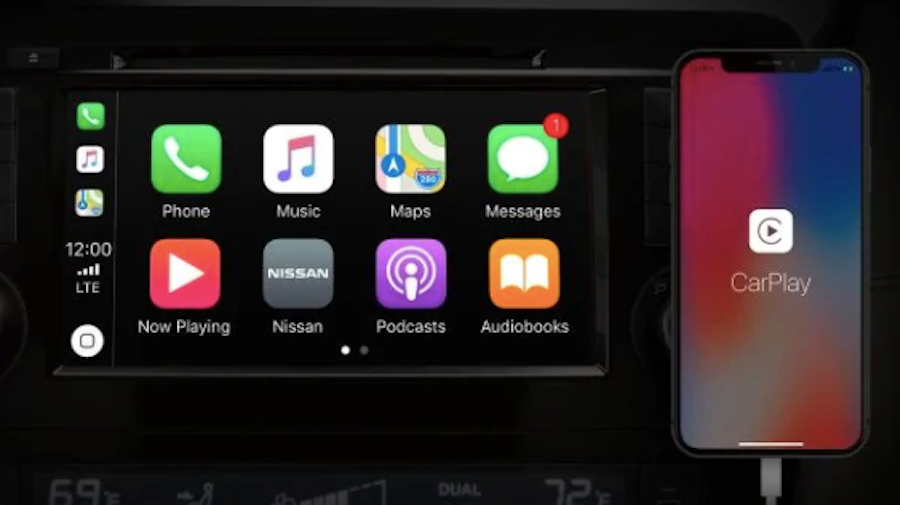
First, unlock your iPhone and use a certified Lightning cable. Plug one end into your phone and the other into the USB port. The USB port usually has a smartphone or CarPlay icon. The system should detect your iPhone automatically.
On your Nissan Rogue’s display, a prompt will ask to enable Apple CarPlay. Tap “Allow” to start. Your iPhone screen will appear on the car’s touchscreen. From here, you can access apps, maps, music, and messages.
Troubleshooting Connection Issues
Sometimes, the connection may fail or not show up. Check if your iPhone is unlocked and the cable is fully plugged in. Try a different USB port if available. Restart your iPhone and the car’s infotainment system.
Make sure your iPhone runs the latest iOS version. Also, confirm that CarPlay is enabled in your phone settings. If problems continue, try a different Lightning cable. These steps often fix common connection issues.
Apple Carplay Features
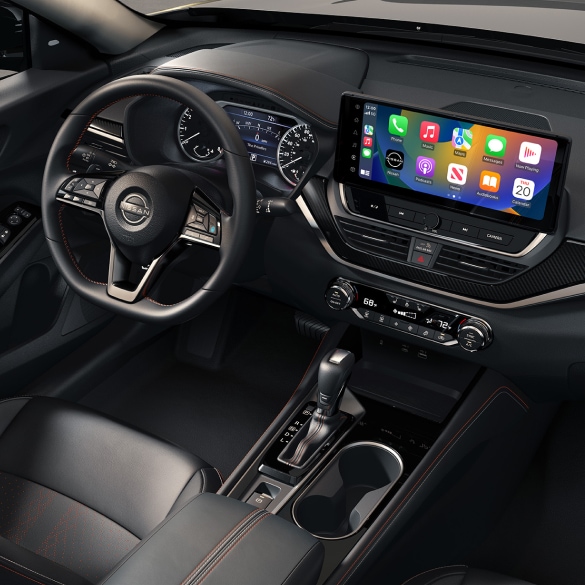
The 2020 Nissan Rogue supports Apple CarPlay. This feature connects your iPhone to the car’s display. It offers easy access to many apps. Drivers can use their phone safely while driving. The interface is simple and clear. Apple CarPlay helps keep your focus on the road.
Navigation And Maps
Apple CarPlay shows your maps on the car screen. You can use Apple Maps or other apps like Google Maps. It gives real-time traffic updates. Voice commands help you set destinations without typing. The system offers turn-by-turn directions. It makes driving in new places easier.
Music And Audio Apps
CarPlay lets you play music from your phone. You can use Apple Music, Spotify, or other apps. It supports podcasts and audiobooks too. The controls are on the car’s screen and steering wheel. This keeps your hands on the wheel. Sound quality stays clear and strong.
Messaging And Calls
With Apple CarPlay, you can send and receive messages. Siri reads texts aloud. You can reply using voice commands. The system also handles phone calls. You can answer or reject calls with a tap. This helps you stay connected without distraction.
Credit: www.nissanusa.com
Alternatives To Apple Carplay
Not everyone prefers Apple CarPlay or uses an iPhone. The 2020 Nissan Rogue offers other options to connect your phone and enjoy smart features. These alternatives help drivers stay connected safely and easily.
Android Auto Support
The 2020 Nissan Rogue supports Android Auto. This system works with many Android phones. It shows apps and navigation on the car’s screen. Drivers can use voice commands to control music and calls. Android Auto makes driving safer and more fun.
Built-in Nissanconnect Features
NissanConnect is the Rogue’s own system. It offers navigation, music, and phone calls without extra apps. You can control it using the touchscreen or voice. NissanConnect also provides safety alerts and vehicle info. It is a helpful tool for daily driving.
Benefits Of Apple Carplay In The Rogue
The 2020 Nissan Rogue supports Apple CarPlay, offering many benefits. This feature connects your iPhone to the car’s screen. It helps you stay focused while driving. It also makes your drive more fun and useful.
Apple CarPlay turns your car’s display into an easy-to-use interface. It shows apps you need, like maps and music. This feature improves safety and user experience. Let’s explore how Apple CarPlay benefits the Rogue.
Enhanced Safety
Apple CarPlay lets you keep your eyes on the road. You can use voice commands to make calls or send texts. This reduces the need to touch your phone. The interface is simple and clear, so you spend less time looking at the screen.
Navigation is easier with real-time directions shown on the display. It helps you avoid distractions and focus on driving. The system also supports hands-free control, which limits accidents caused by phone use.
Improved User Experience
Using Apple CarPlay in the Rogue is smooth and fast. The screen shows your favorite apps clearly. Music, podcasts, and audiobooks are easy to access. You can control them without complicated menus.
Siri voice assistant responds quickly to your commands. It helps you find places, send messages, and play media. The system updates automatically, keeping apps fresh and reliable. Apple CarPlay makes every drive more enjoyable and less stressful.
Upgrading Your Rogue For Carplay
Upgrading your 2020 Nissan Rogue to include Apple CarPlay can improve your driving experience. It lets you use your iPhone safely while on the road. Many drivers want this feature for easy access to maps, music, and calls. There are a few ways to get Apple CarPlay in your Rogue. Some involve software updates, and others use aftermarket products. Choose the best option for your needs and budget.
Software Updates
Some 2020 Nissan Rogue models may support Apple CarPlay after a software update. Check your vehicle’s infotainment system for available updates. Visit a Nissan dealer or use the Nissan website to see if your car qualifies. Updating the software can add CarPlay without extra hardware. Make sure your phone and system are compatible before updating. This method keeps your car’s original look and feel.
Aftermarket Solutions
Aftermarket devices offer another way to add Apple CarPlay to your Rogue. These devices replace or connect to your current infotainment system. They often include touch screens and additional features. Installation may require professional help, depending on the product. Aftermarket solutions vary in price and quality. Research carefully to find one that fits your car and needs. This option works well if your Rogue cannot get a software update.
Credit: www.gunnnissan.com
Frequently Asked Questions
Does The 2020 Nissan Rogue Support Apple Carplay?
Yes, the 2020 Nissan Rogue comes with Apple CarPlay compatibility for easier smartphone use.
Is Apple Carplay Standard In All 2020 Rogue Trims?
Apple CarPlay is standard on most trims but may not be available on the base model.
How Do I Connect Iphone To 2020 Nissan Rogue?
Connect your iPhone using a USB cable to access Apple CarPlay on the Rogue’s display.
Can I Use Siri With Apple Carplay In 2020 Rogue?
Yes, Siri voice commands work through Apple CarPlay for hands-free control.
Does Apple Carplay Work Wirelessly In 2020 Nissan Rogue?
No, the 2020 Rogue requires a wired USB connection to use Apple CarPlay.
What Apps Are Available Through Apple Carplay In Rogue?
You can use apps like Maps, Messages, Music, Podcasts, and compatible third-party apps.
Conclusion
The 2020 Nissan Rogue supports Apple CarPlay for easy smartphone use. It lets drivers access apps, music, and maps safely. The system works well and is simple to connect. This feature adds convenience without distraction on the road. Choosing a Rogue means staying connected while driving.
Apple CarPlay makes trips more enjoyable and less stressful. It fits well with the vehicle’s tech setup. Overall, the 2020 Rogue offers good Apple CarPlay integration. This helps drivers enjoy their favorite apps hands-free. A smart choice for tech-friendly drivers.
As an Amazon Associate, I earn from qualifying purchases

