
Have you ever wished you could start your Nissan Altima without stepping outside? Imagine getting your car warmed up on a chilly morning or cooled down during a hot afternoon, all before you even open the door.
Learning how to remote start your Nissan Altima not only adds convenience but also saves you precious time every day. In this guide, you’ll discover simple, step-by-step instructions that anyone can follow. Ready to make your driving experience easier and more comfortable?
Keep reading to unlock the full potential of your Nissan Altima’s remote start feature.

Credit: www.youtube.com
Remote Start Basics
Remote start lets you start your Nissan Altima’s engine from a distance. This feature uses a key fob or smartphone app. It warms or cools your car before you enter. This adds comfort and saves time.
Understanding how remote start works helps you use it safely. It also helps protect your vehicle.
What Is Remote Start
Remote start is a system that starts your car without being inside. You press a button on your key fob or app. The engine begins running, so the car heats or cools.
This feature works within a certain range. Your car stays locked during remote start. It will not move until you unlock and enter.
Benefits Of Remote Starting Your Altima
Remote starting your Altima saves time and adds comfort. On cold days, it warms the engine and cabin. On hot days, it cools the inside before you get in.
This helps protect the engine by warming it gently. It also improves fuel efficiency. You avoid sitting inside an uncomfortable car.
Check Your Nissan Altima Model
Before starting your Nissan Altima remotely, check your car model. Not all Altima models support remote start. Knowing your model helps avoid confusion and saves time. It also guides you on the right system to use.
Some Nissan Altima cars come with remote start ready from the factory. Others need an extra system installed. Confirming your model ensures you follow the correct steps for your car.
Compatible Models For Remote Start
Most Nissan Altima models from 2013 and newer support remote start. The feature is common in SV, SL, and Platinum trims. Base models may not have remote start option. Check your key fob for a remote start button. If not present, your model likely needs an aftermarket system.
Older Altima models usually do not support remote start from the factory. Some newer models may require a software update. Visit your Nissan dealer to confirm your car’s compatibility.
Factory Vs Aftermarket Systems
Factory remote start systems come pre-installed or as a dealer add-on. They work smoothly with your car’s existing electronics. Factory systems also keep your warranty intact. The key fob has a dedicated button for remote start.
Aftermarket systems are installed after buying the car. These systems fit most Altima models. Installation requires a professional to avoid damage. Aftermarket systems may cost less but can void some warranties. They often come with their own remote or app for control.
Preparing Your Vehicle
Preparing your Nissan Altima for remote start is a simple process. It helps ensure the system works smoothly and safely. Taking a few steps before starting can save time and avoid problems.
Follow the right preparation steps to keep your car secure. Check your key fob and review important safety rules. This makes remote start easy and worry-free.
Ensure Key Fob Functionality
Check the battery in your key fob. A weak battery can stop the remote start from working. Replace the battery if the buttons feel weak or unresponsive. Test all buttons to confirm they work well.
Keep the key fob close to your body or inside the car. This helps maintain a strong signal. Avoid placing it near metal objects or electronic devices that cause interference.
Safety Precautions Before Starting
Make sure your Nissan Altima is parked in a safe area. The car should be in “Park” with the parking brake on. Check that no one is near the car before starting the engine.
Look around the vehicle for obstacles or children. Confirm all windows and doors are closed. This prevents any accidents or damage during remote start.
Credit: www.youtube.com
Using The Factory Remote Start
The Nissan Altima comes with a built-in remote start feature. This allows you to start your car’s engine from a distance. You can warm up or cool down the car before you get inside. Using the factory remote start is easy and safe. It works with the original key fob that comes with the car.
This feature helps save time on cold or hot days. It also improves comfort by adjusting the temperature early. Understanding how to use the remote start correctly is important. Follow the steps carefully to activate it without problems.
Step-by-step Activation
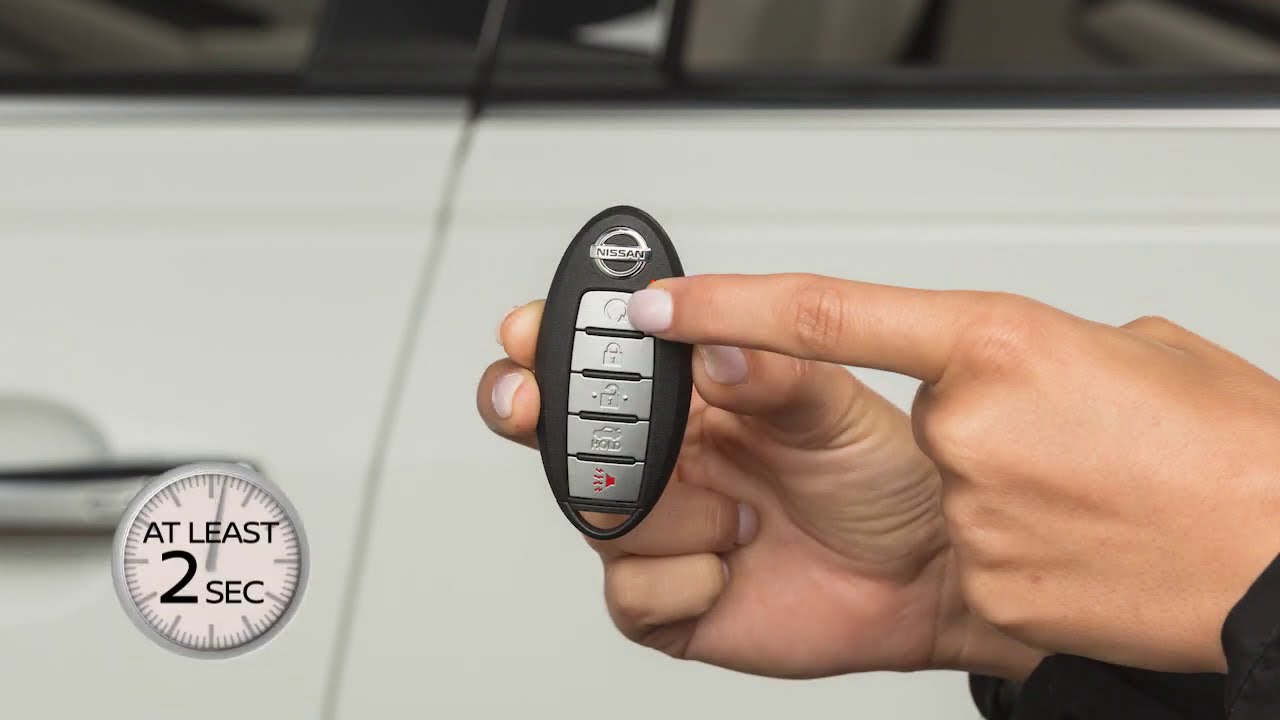
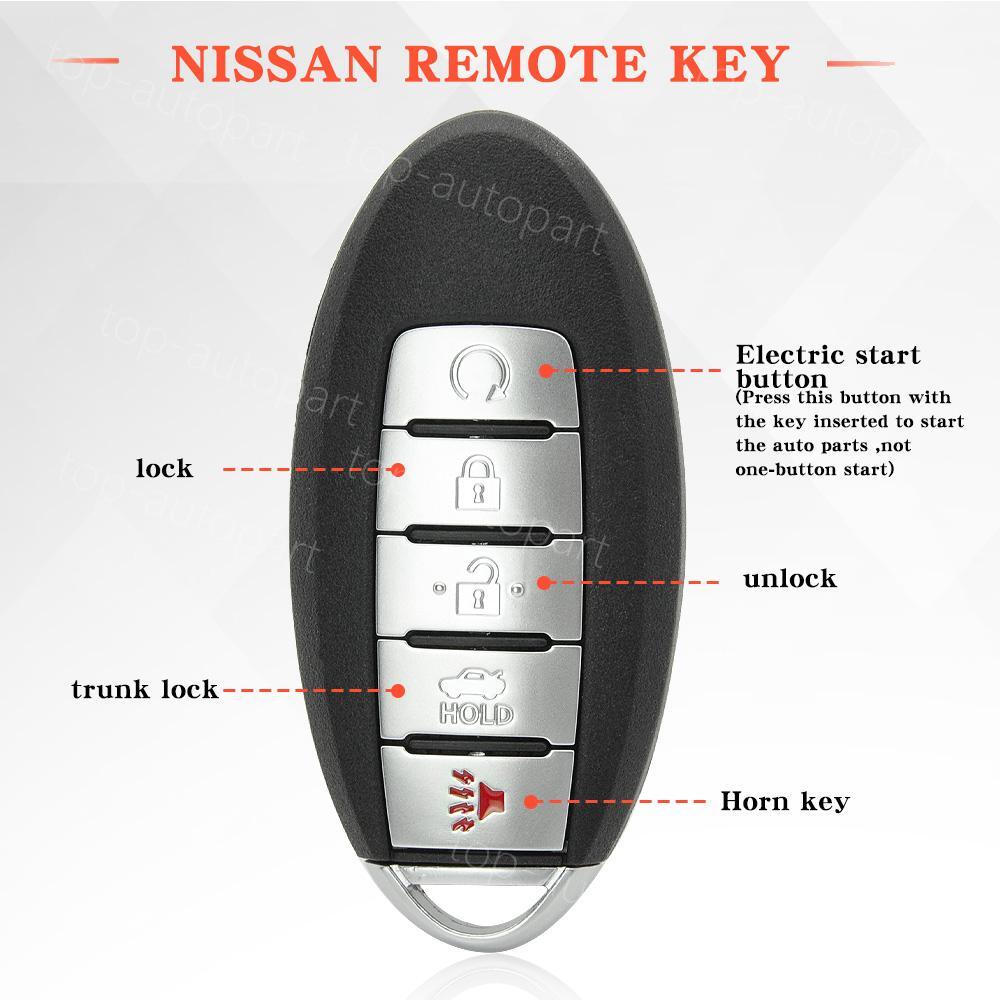
Begin by standing close to your Nissan Altima. Hold the key fob in your hand. Press the lock button once to secure the doors. Next, press and hold the remote start button. This button usually has a circular arrow symbol.
Hold the button for about two seconds. The car’s lights will flash, and the engine will start. The vehicle will run for about 10 minutes. You can repeat the process to add more time. To turn off the engine, press any button on the key fob or enter the car.
Troubleshooting Common Issues
If the remote start does not work, check the key fob battery. Replace it if the battery is weak or dead. Make sure the car is in park mode. The hood must be closed fully for the system to work.
The remote start may not activate if the doors are open. The system also won’t work if the alarm is triggered. Sometimes, cold weather can affect the remote start range. Try standing closer to the car if it fails to start.
Reset the system by locking and unlocking the doors manually. This can fix minor glitches. Consult your Nissan Altima owner’s manual for detailed instructions. Contact a dealer if problems continue despite troubleshooting.
Installing Aftermarket Remote Start
Installing an aftermarket remote start system in your Nissan Altima adds convenience and comfort. It lets you start your car remotely, warming or cooling the interior before you get inside. This feature is handy during hot summers or cold winters.
Choosing the right remote start system is important. The system must work well with your Altima’s electronics. Some kits include extra features like keyless entry or security alarms. Picking a reliable brand ensures better performance and fewer problems.
Choosing The Right System
Select a system compatible with your Nissan Altima model year. Check if it supports your car’s key fob and security system. Look for units with clear instructions and good customer support. Avoid very cheap kits as they may fail or cause issues. Consider systems with a warranty for peace of mind.
Installation Process Overview
Start by reading the system’s manual thoroughly. Find the wiring harness under the dashboard near the steering column. Connect the remote start wires to the correct car wires using the guide. Use wire strippers and crimp connectors for a secure fit.
Test the remote start before reassembling the dashboard. Make sure the engine starts and stops properly from the remote. Check that all car functions like lights and locks still work. If unsure, seek help from a professional installer. Proper installation avoids damage and ensures safety.
Tips For Optimal Use
Using the remote start feature of your Nissan Altima can save time and increase comfort. Follow these tips to use it well and avoid problems. Proper use helps your car run smoothly and keeps the battery healthy.
Simple steps can improve the overall experience of remote starting your vehicle. Learn how to protect your battery and be respectful to others while using this feature.
Maximizing Battery Life
Use remote start only when necessary. Avoid starting the engine multiple times in a short period. This can drain the battery quickly.
Keep your car battery clean and check it regularly. Cold weather can reduce battery power, so use remote start wisely during winter. Turn off the remote start if you do not need the engine running.
Remote Start Etiquette
Remote start can be noisy and disturbing. Use it in a way that does not bother your neighbors or others nearby. Start your car early enough but not too long before you leave.
Do not leave your car running unattended for a long time. Always lock your vehicle after using remote start. This keeps your car safe and secure.
Troubleshooting And Maintenance
Remote starting a Nissan Altima offers great convenience. Still, it can face issues or need regular care. Troubleshooting and maintenance keep the system working well. They help avoid unexpected problems and ensure safety.
Common Problems And Fixes
Sometimes, the remote start does not work. A weak key fob battery often causes this. Replace the battery to fix the issue quickly. Another problem is the car not starting due to a faulty sensor. Check the brake or hood sensors and clean or repair them if needed.
Interference from other electronic devices can block the remote signal. Move away from such devices or reset the remote system. In some cases, the engine may shut off immediately. This can happen if the car detects a security issue. Reset the alarm or consult a technician to resolve this.
Regular Maintenance Tips
Keep the key fob clean and dry. Check its battery every six months. Test the remote start system often to confirm it works correctly. Clean sensors and wiring to prevent dirt buildup. Protect the car’s battery by driving regularly or using a trickle charger.
Update the car’s software as recommended by Nissan. Store the key fob in a cool place away from metal objects. Follow the vehicle manual for specific remote start care instructions. Regular care extends the system’s life and ensures smooth operation.
Credit: www.ebay.com
Frequently Asked Questions
How Do I Activate Remote Start On My Nissan Altima?
Press the lock button twice, then hold the remote start button for three seconds.
Can I Remote Start My Nissan Altima From A Smartphone?
Yes, with NissanConnect app, you can start your car remotely using your phone.
Does Remote Starting My Nissan Altima Work In Cold Weather?
Yes, remote start warms the engine and interior before you enter the car.
How Long Does The Remote Start Run On A Nissan Altima?
The engine runs for about 10 minutes before it shuts off automatically.
Is Remote Start Safe To Use On My Nissan Altima?
Yes, it won’t start if the car is already running or if the doors are open.
What Should I Do If Remote Start Isn’t Working On My Altima?
Check the battery in your key fob and ensure your car is in park.
Conclusion
Remote starting a Nissan Altima saves time and adds comfort. It helps warm or cool the car before driving. Always follow the steps carefully to avoid mistakes. Practice a few times to feel confident. This simple skill improves your daily routine.
Stay safe and enjoy your ride every day.
As an Amazon Associate, I earn from qualifying purchases

