
If you own a Nissan, you probably want the convenience of opening your garage door without fumbling for a remote. Programming your Nissan’s built-in garage door opener might sound tricky, but it’s easier than you think.
In this guide, you’ll discover simple, step-by-step instructions to get your garage door working with your car quickly and smoothly. Imagine pulling up to your home and opening the door with just a button inside your Nissan—no extra devices needed.
Keep reading, and you’ll have your system set up in no time.
Credit: www.nissanofmckinney.com
Check Compatibility
Before programming your Nissan garage door opener, check if it is compatible. This step saves time and prevents frustration. Not all Nissan models support garage door programming. Some openers might not work with certain garage door systems.
Understanding compatibility helps you know what to expect. It ensures your vehicle and garage door system will communicate properly. This step is important for a smooth programming process.
Check Your Nissan Model
Start by identifying your Nissan model and year. Compatibility varies by model and production year. Use your owner’s manual or Nissan’s official website. This helps find which models support garage door programming.
Identify The Garage Door Opener Type
Find out the brand and type of your garage door opener. Some systems use rolling code technology. Others use fixed code systems. Knowing this helps determine if your Nissan can connect with it.
Look For Homelink Or Built-in Garage Door System
Check if your Nissan has a built-in HomeLink system. HomeLink is common in many Nissan cars. It allows easy programming with garage door openers. If your car lacks HomeLink, programming may not be possible.
Consult Your Owner’s Manual
The owner’s manual provides specific details on compatibility. It lists supported garage door opener brands. It also explains programming steps for your vehicle. Keep the manual handy for quick reference.
Contact Nissan Support Or Dealer
Reach out to Nissan customer service for help. Dealers can confirm if your car supports garage door programming. They offer advice on compatible openers. This ensures you have accurate, up-to-date information.

Credit: www.youtube.com
Locate Homelink Buttons
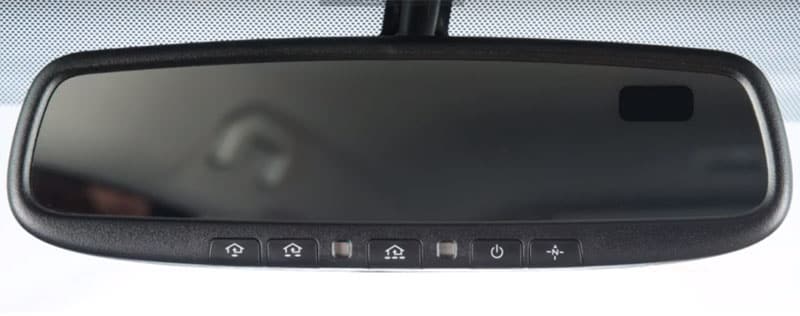
Locating the HomeLink buttons is the first step to program your Nissan garage door opener. These buttons are the key to connecting your car to your garage system. Knowing their position saves time and makes programming easier.
HomeLink buttons are usually found inside your Nissan. They blend well with the car’s interior. They look like small, rectangular buttons, often grouped together.
Check The Overhead Console
The most common place to find HomeLink buttons is the overhead console. This area is above the rearview mirror. Look closely for three small buttons in a row. They might have tiny house icons on them.
Inspect The Sun Visor
In some Nissan models, the HomeLink buttons are on the sun visor. Flip down the visor to see if the buttons are there. They look similar to the overhead console buttons and are easy to spot.
Look Near The Rearview Mirror
Another spot to check is around the rearview mirror. Some Nissans place the buttons on the mirror’s base or nearby. Scan the area carefully for any small, labeled buttons.
Consult Your Owner’s Manual
If you cannot find the buttons, the owner’s manual will help. It has diagrams showing exact button locations. This guide is useful for different Nissan models and years.
Clear Previous Codes
Clearing previous codes from your Nissan garage door opener is an important first step. This step removes old signals stored in the system. It prevents confusion with new codes and ensures smooth operation.
Old codes can cause your garage door to open unexpectedly. They might also block new programming. Clearing these codes helps your opener work only with your current remote.
Locate The Garage Door Opener Button
Find the small button on your Nissan’s rearview mirror or overhead console. This button controls the garage door opener system. It is usually marked with a symbol of a house or waves.
Press And Hold The Button
Press the button firmly and hold it for about 20 seconds. The indicator light will start to flash slowly. Keep holding until the light blinks rapidly or turns off. This signals all codes have been erased.
Release The Button And Test
Let go of the button after the light changes. Try pressing the button again. The garage door should not respond, confirming the clearing process worked.
Prepare Garage Door Opener
Start by locating the garage door opener button inside your Nissan. Next, clear any old codes before programming a new one. Follow simple steps to sync your car with the garage system quickly.
Find The Learn Button
Start by locating the learn button on your garage door opener. This button is usually on the back or side of the motor unit. It may be a small, round, or square button. The color can vary, often red, orange, purple, or yellow. Pressing this button puts the opener in programming mode. This step is essential before you can link your Nissan remote to the opener.
Reset The Opener If Needed
Sometimes, you may need to reset the garage door opener first. This clears any old codes stored in the system. To reset, press and hold the learn button for about 10 seconds. The indicator light will turn off or blink, showing the reset is complete. Resetting helps avoid conflicts with other remotes. It ensures your Nissan remote pairs correctly and works smoothly.
Program Homelink Buttons
Programming the HomeLink buttons in your Nissan allows you to control your garage door easily. These buttons work like a remote built into your car. Setting them up saves time and keeps your hands free. The process is simple and takes only a few minutes.
Press And Hold Buttons
Start by turning your car’s ignition to the “On” position. Find the HomeLink buttons on your rearview mirror or visor. Press and hold the button you want to program. Keep holding it until the indicator light starts blinking slowly. This means the button is ready to sync with your garage door opener.
Sync With Garage Door Opener
Go to your garage door opener unit on the ceiling of your garage. Press and hold the “Learn” or “Smart” button until the indicator light turns on. Return to your car and press the programmed HomeLink button three times. The garage door should move, showing successful sync. Test the button to make sure it works every time.
Test The Programming
Testing the programming of your Nissan garage door opener is an important step. It confirms if the programming was successful. Without testing, you might not know if the door will respond properly.
This step helps avoid frustration. It ensures your garage door opens and closes as expected. Testing is quick and easy. It saves time and effort later.
How To Test The Garage Door Opener
Stand near your garage door with the Nissan remote in hand. Press the button you programmed. Watch the garage door carefully. It should start moving immediately.
If the door opens or closes smoothly, programming is complete. If nothing happens, repeat the programming steps. Check the battery in the remote if needed.
Check For Range And Response
Walk a few steps away from the garage. Press the remote button again. The door should respond from different distances.
This test confirms the remote’s signal strength. It also shows if the opener reacts quickly. Poor response might mean weak batteries or interference nearby.
Troubleshooting Common Issues
Sometimes the door does not move after programming. Try pressing the remote closer to the sensor. Replace old batteries in the remote.
Check if the garage door opener’s power is on. Look for any obstacles blocking the door. Clear the path and try again.
Troubleshooting Tips
Programming a Nissan garage door opener usually works smoothly. Sometimes, issues may arise that stop it from working. These troubleshooting tips help fix common problems quickly. Stay calm and follow the steps carefully.
Check Battery Status
A weak battery can cause the opener to fail. Check the remote’s battery first. Replace it if the light on the remote is dim or not turning on. Fresh batteries often solve many problems fast.
Reprogram If Necessary
The opener may lose its programming. Try reprogramming it to the garage door motor. Follow the steps in the programming guide carefully. This resets the connection and often restores full function.
Consult Vehicle Manual
The Nissan vehicle manual has specific instructions for your model. It explains programming steps and troubleshooting tips. Use it as a guide for exact details. Manuals often have solutions for rare issues too.

Credit: www.youtube.com
Frequently Asked Questions
How Do I Start Programming A Nissan Garage Door Opener?
Locate the HomeLink button inside your Nissan and clear previous settings first.
How Long Does Nissan Garage Door Programming Take?
Programming usually takes 5 to 10 minutes to complete.
Can I Program Multiple Garage Doors On Nissan Opener?
Yes, you can program up to three different garage doors.
What If My Nissan Garage Door Opener Doesn’t Program?
Check battery life, car ignition, and follow the programming steps carefully.
How To Reset Nissan Garage Door Opener To Factory Settings?
Hold the two outside HomeLink buttons until the indicator light blinks.
Does Programming A Nissan Opener Need A Remote Control?
Yes, you need the original garage door remote to program the opener.
Conclusion
Programming your Nissan garage door opener is simple and quick. Follow the steps carefully to avoid mistakes. Check your remote and vehicle manual for details. Test the opener to ensure it works every time. Save time by doing it yourself at home.
Keep safety in mind while programming. This guide helps you stay confident with your garage door. Enjoy the convenience of easy access to your garage. No need to call a technician or wait. Now, your Nissan garage door opener is ready to use.
As an Amazon Associate, I earn from qualifying purchases

