
If you want to make your drives smoother and less tiring, learning how to set cruise control on your Nissan Altima is a smart move. Imagine being able to maintain a steady speed without constantly pressing the gas pedal—saving you effort and helping with fuel efficiency.
In this guide, you’ll discover simple, step-by-step instructions that anyone can follow. Whether you’re heading on a long road trip or just want an easier daily commute, mastering this feature will change the way you drive. Keep reading to unlock the full potential of your Nissan Altima’s cruise control.
Locate Cruise Control Buttons
To use cruise control in your Nissan Altima, first find the control buttons. These buttons let you set and adjust the speed easily. Knowing where they are saves time and makes driving smoother.
Identify Steering Wheel Controls
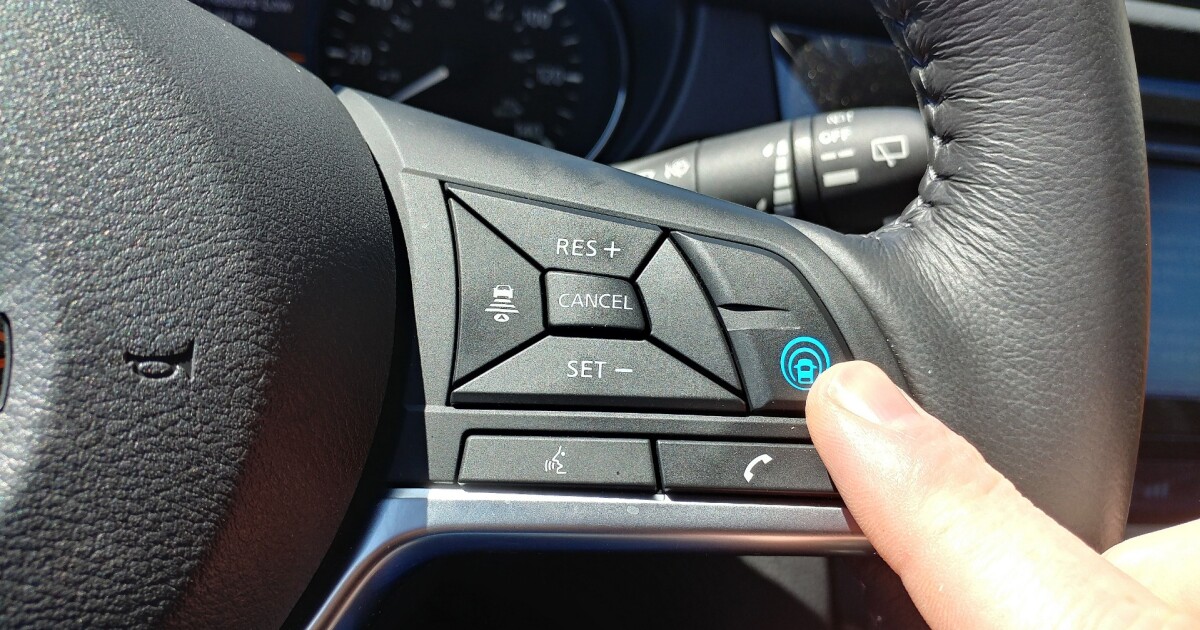
Look at the right side of the steering wheel. You will see buttons labeled with words like “ON,” “OFF,” “SET,” and “CANCEL.” These control the cruise system. The “ON” button activates the system. “SET” locks in your current speed. “CANCEL” turns off cruise control without braking.
Check Dashboard Indicators
After pressing “ON,” look at the dashboard. A small icon or light will appear. This shows the cruise control is ready. When you set your speed, the light stays on. It confirms the system is active and working correctly.
Credit: newatlas.com
Prepare Your Nissan Altima
Preparing your Nissan Altima for cruise control is simple. Follow a few basic steps to get ready. This ensures a smooth and safe drive using the cruise control feature.
Before activating cruise control, the car must be in the right state. Check that the road is clear and safe for steady speed driving.
Start The Engine
Insert the key into the ignition or press the start button. Make sure the engine starts smoothly. Keep your foot on the brake pedal while starting. Check all dashboard lights turn off after a few seconds. The car is now ready to drive.
Reach Desired Speed
Press the accelerator gently to increase speed. Drive until you reach the speed you want to maintain. Avoid sudden speed changes or hard acceleration. Keep a steady speed on a clear road. Once at the right speed, you can set the cruise control.
Activate Cruise Control
Activating cruise control in your Nissan Altima makes driving easier on long trips. It lets you keep a steady speed without pressing the gas pedal. This section explains how to activate cruise control step-by-step.
Press The On/off Button
Find the cruise control button on the steering wheel. It usually says “ON/OFF.” Press it once to turn on the system. A light will appear on the dashboard. This means cruise control is ready to use.
Set The Speed
Drive at the speed you want to maintain. Press the “SET” button on the steering wheel. The car will keep this speed automatically. You can now relax your foot from the gas pedal. Adjust the speed later using the “+ / -” buttons.
Credit: www.reddit.com
Adjusting Cruise Speed
Adjusting the cruise speed on your Nissan Altima is simple and helps maintain a steady pace. This feature lets you change speed without using the gas pedal. Use the controls on the steering wheel to increase or decrease speed safely.
Increase Speed
To increase speed, press the “+” button on the cruise control switch. Each press raises the speed by 1 mph or km/h, depending on your settings. Hold the button to raise speed quickly. Release the button when you reach the desired speed.
Decrease Speed
Press the “–” button to lower the cruise speed. Each tap reduces speed by 1 mph or km/h. Hold the button to slow down faster. Let go once you reach the speed you want. Always adjust speed carefully and watch the road.
Temporarily Cancel Cruise
Temporarily canceling cruise control in your Nissan Altima lets you pause the set speed. This feature helps you regain full control without turning off the system. It is useful in traffic or sudden slowdowns. The car will remember the speed for later use.
Using Brake Pedal
Press the brake pedal gently to cancel cruise control. The system senses your action and stops maintaining speed. You can slow down or stop the car normally. The cruise control light on the dashboard will turn off. Release the brake to resume driving manually.
Using Cancel Button
Locate the cancel button on the steering wheel. Press it once to pause cruise control without braking. This keeps the system ready to resume the previous speed. The dashboard indicator will show the change. Press the resume button later to continue the set speed.
Resume Cruise Control
The resume cruise control feature helps you return to your set speed after slowing down or braking. It saves time and effort during long drives. Instead of resetting speed manually, use the resume function for convenience and safety.
Press Resume Button
Locate the resume button on your Nissan Altima’s steering wheel. It is usually marked with “RES” or a similar icon. Press this button once to reactivate the cruise control system. The car will start accelerating to the last set speed.
Maintain Previous Speed
After pressing the resume button, your Nissan Altima keeps the speed you set before. This helps maintain a steady pace without using the gas pedal. It improves fuel efficiency and reduces driver fatigue on highways and long trips.
Turn Off Cruise Control
Turning off cruise control in your Nissan Altima is simple. Knowing how to deactivate it helps you take full control of the car. This is important for safe driving in traffic or changing road conditions.
Press Off Button
The easiest way to turn off cruise control is to press the Off button. It is usually on the steering wheel. Pressing it stops the system immediately. The car then returns to manual speed control. This method is quick and safe.
Manual Control
You can also turn off cruise control by using the brake or clutch pedal. Pressing the brake pedal cancels cruise control. The car slows down as you press the brake. This lets you react fast to traffic changes. On a manual car, pressing the clutch also turns off cruise control. This method helps keep you in control at all times.
Safety Tips For Cruise Control
Using cruise control in your Nissan Altima can make driving easier. It helps keep your speed steady on long trips. Still, safety must come first. Knowing the right way to use cruise control keeps you and others safe.
Use In Suitable Conditions
Set cruise control only on highways or open roads. Avoid using it in heavy traffic or bad weather. Rain, snow, and fog can make roads slippery. Cruise control may not react well to sudden changes. Use it when the road is clear and dry.
Stay Alert And Ready To Brake
Even with cruise control on, watch the road closely. Keep your hands near the steering wheel. Be ready to brake or turn at any moment. Cruise control does not replace your attention. Stay alert to keep control of your car.

Credit: www.youtube.com
Frequently Asked Questions
How Do I Activate Cruise Control On A Nissan Altima?
Press the “ON/OFF” button on the steering wheel to activate cruise control in your Nissan Altima.
What Speed Should I Set For Cruise Control In Altima?
Set the speed to your desired driving speed, usually above 25 mph, for cruise control to work.
How Do I Adjust Cruise Control Speed In A Nissan Altima?
Use the “SET +” button to increase and “SET -” to decrease the cruise speed smoothly.
Can I Cancel Cruise Control Without Turning It Off?
Yes, tap the brake or press the “CANCEL” button to pause cruise control temporarily.
Is Cruise Control Safe To Use In City Driving?
Cruise control is best used on highways, not in heavy city traffic or stop-and-go conditions.
What Should I Do If Cruise Control Doesn’t Work On My Altima?
Check the cruise control fuse and buttons; consult a mechanic if the problem persists.
Conclusion
Setting cruise control on a Nissan Altima is simple and quick. Press the button to activate, then set your desired speed. You can adjust speed easily while driving. This helps maintain steady speed on highways and reduces fatigue. Always stay alert and ready to brake when needed.
Using cruise control can make long drives more comfortable. Try it on your next trip to enjoy a smoother ride. Practice a few times to feel confident with the controls. Safe driving starts with knowing your car’s features well.
As an Amazon Associate, I earn from qualifying purchases

