
Is your Nissan Rogue’s audio system suddenly silent, leaving you frustrated during your drive? You’re not alone.
When the sound cuts out, it can feel like your favorite music or important navigation prompts have vanished. But don’t worry—unmuting your Nissan Rogue’s audio system is easier than you think. You’ll discover simple, step-by-step solutions to get your sound back quickly and enjoy every moment behind the wheel.
Keep reading, and you’ll be tuning into your favorite tunes in no time.
Credit: www.ariyaforums.com
Locate The Audio Controls
To unmute the audio system in your Nissan Rogue, the first step is to locate the audio controls. Knowing where these controls are helps you quickly fix the sound. The controls are designed to be easy to find and use.
These audio controls allow you to adjust volume, change stations, and mute or unmute the sound. They are usually placed in convenient spots inside the car for easy reach.
Audio Controls On The Steering Wheel
The Nissan Rogue often has audio buttons on the steering wheel. These buttons include volume up, volume down, and a mute or unmute option. Using these controls keeps your hands on the wheel and eyes on the road.
Dashboard Audio Control Panel
The main audio controls are on the dashboard. Look near the center of the dashboard for buttons and knobs. The volume knob usually doubles as the mute button by pressing it.
Touchscreen Audio Controls
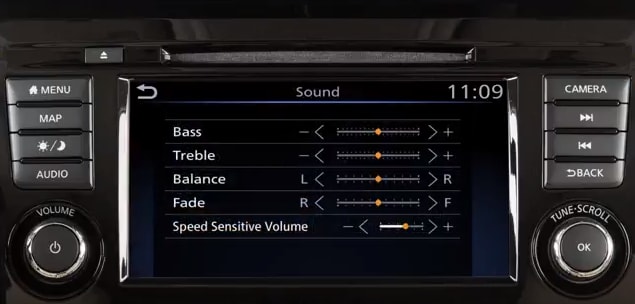
Many Nissan Rogues have a touchscreen display. This screen shows audio settings and lets you adjust volume and mute options digitally. Tap the speaker icon or volume control to unmute the system.
Check The Mute Button
Check the mute button on your Nissan Rogue’s audio system. Sometimes, audio stays silent because the mute is on. Press the mute button again to restore sound quickly.
Locate The Mute Button On The Dashboard
The mute button in a Nissan Rogue is often on the dashboard or near the audio controls. It might be a small button marked with a speaker icon and a slash. Press this button once to check if the audio unmutes. Sometimes the mute function turns on by accident during driving.
Use The Steering Wheel Controls
Many Nissan Rogue models have audio controls on the steering wheel. Look for a button with a speaker symbol or the word “Mute.” Press it to toggle the mute status. This is a quick way to unmute without taking your hands off the wheel.
Check The Volume Knob
Some Nissan Rogues mute the audio when the volume is turned all the way down. Turn the volume knob up slightly to restore sound. This simple step often solves the mute issue without extra effort.
Use The Steering Wheel Buttons
The steering wheel buttons in the Nissan Rogue offer a simple way to control the audio system. These buttons help you adjust volume and mute settings without taking your hands off the wheel. This feature keeps you safe and focused while driving.
Using the steering wheel buttons to unmute the audio is quick and easy. You can restore sound with just a press, avoiding distractions on the road.
Locate The Audio Control Buttons
First, find the audio control buttons on the left side of the steering wheel. They include volume up, volume down, and a mute button. The mute button usually has a speaker icon with a line through it.
Press The Mute Button To Unmute
Press the mute button once to unmute the audio system. The sound will return immediately. Pressing it again mutes the audio again. It’s a simple toggle function.
Use Volume Buttons To Adjust Sound
If the audio does not unmute with the mute button, try pressing the volume up button. This action often restores sound by increasing volume. Press volume down to lower the sound as needed.
Adjust Volume Settings
Adjusting the volume settings in your Nissan Rogue is a simple way to unmute the audio system. This allows you to hear music, calls, and alerts clearly. Understanding how to control volume helps you enjoy a better driving experience.
Locate The Volume Control Knob
The volume control knob is usually on the center console or steering wheel. Turn it clockwise to increase volume. Turn it counterclockwise to lower volume or mute.
Use The Touchscreen Audio Controls
Your Nissan Rogue has a touchscreen that controls audio settings. Tap the volume icon on the screen. Slide the bar to adjust volume levels smoothly.
Look for a mute button on the dashboard or steering wheel. Press it once to unmute the audio. Press again to mute the sound.
Adjust Volume Using Voice Commands
Many Nissan Rogues support voice control. Press the voice button and say “increase volume” or “unmute audio.” The system will respond and adjust the sound.
Reset The Audio System
Resetting the audio system in your Nissan Rogue can fix common sound issues. This simple step often restores audio settings to normal. It helps clear glitches causing the system to stay muted.
Resetting is quick and does not require special tools. It returns the system to factory settings. This process can solve problems without visiting a service center.
Locate The Reset Button
First, find the reset button on the audio system. It is usually small and may need a pointed object to press. Check near the display or control panel for a tiny hole or button labeled “Reset.”
Press And Hold The Reset Button
Use a pen or paperclip to press the reset button. Hold it down for about 10 seconds. The screen may turn off and on again, signaling the reset is complete.
Restart The Audio System
Turn off the car and open the door after resetting. Wait a few moments. Close the door and start the car again. Check if the audio is no longer muted.

Credit: www.youtube.com
Troubleshoot Common Issues
Audio issues in a Nissan Rogue can be frustrating. Simple problems often cause the audio system to mute unexpectedly. Troubleshooting these issues saves time and avoids costly repairs. Follow these steps to identify and fix common audio system problems quickly.
Inspect The Fuses
Check the fuse box for any blown fuses. A blown fuse can cut power to the audio system. Locate the fuse box under the dashboard or in the engine compartment. Use the owner’s manual to find the specific fuse for the audio system. Replace any blown fuse with one of the same rating. This can restore sound to your system immediately.
Update The Infotainment Software
Outdated software can cause audio glitches. Visit the Nissan website or use the infotainment system settings to check for updates. Download and install the latest software version. This process can fix bugs that mute the audio. Keep the system updated to ensure smooth performance.
Consult The Owner’s Manual
The owner’s manual holds valuable information. It guides through basic troubleshooting and system settings. Look for sections about audio settings and mute functions. The manual may offer specific instructions for your model year. This resource helps resolve many common audio problems without professional help.
Prevent Accidental Muting
Accidental muting of the audio system in your Nissan Rogue can be frustrating. It interrupts your music or calls without warning. Taking steps to prevent this can improve your driving experience. Staying aware and making small adjustments helps keep the sound just right.
Adjust The Steering Wheel Controls Sensitivity
The buttons on the steering wheel control audio functions. Sometimes, pressing them too lightly can mute the system. Check your vehicle settings to adjust button sensitivity. This reduces the chance of muting by mistake.
Keep The Mute Button Out Of Reach
Locate the mute button on your dashboard or console. Avoid placing objects near it that might press it unintentionally. Keeping this area clear limits accidental presses. It also helps you find the button easily when needed.
Use Voice Commands Carefully
Nissan Rogue supports voice commands for audio control. Speaking too close to the microphone may trigger mute. Speak clearly and pause before giving commands. This prevents accidental muting through voice activation.
Check For Software Updates
Audio system bugs can cause unexpected muting. Regularly update your vehicle’s software. Updates often fix glitches and improve system stability. This keeps your audio working smoothly without surprises.
Credit: www.cerritosnissan.com
Frequently Asked Questions
How Do I Unmute The Nissan Rogue Audio System?
Press the volume knob or the mute button once to unmute the audio system.
Where Is The Mute Button On Nissan Rogue Audio?
The mute button is usually on the steering wheel or near the volume control.
Can I Unmute Using Voice Commands In Nissan Rogue?
Yes, say “unmute” or “turn on audio” if your model supports voice control.
Why Is My Nissan Rogue Audio System Muted Suddenly?
The system may mute due to a button press, phone call, or system settings.
How To Fix Nissan Rogue Audio If Unmute Doesn’t Work?
Try restarting the car or resetting the audio system to fix mute issues.
Does Unplugging The Battery Unmute Nissan Rogue Audio?
Unplugging the battery can reset the system, but it’s not recommended just to unmute.
Conclusion
Unmuting the audio system in your Nissan Rogue is simple and quick. Just follow the steps clearly to hear sound again. Check your volume settings and mute button first. Use the steering wheel controls or touchscreen if available. This helps avoid confusion and saves time.
Enjoy your music and calls without interruptions. Staying calm and patient makes the process easier. Now, your Nissan Rogue’s audio will work perfectly. Drive safely and enjoy every ride with sound.
As an Amazon Associate, I earn from qualifying purchases

