
Are your Nissan’s side mirrors tilting down every time you shift into reverse, making it hard to focus on the road ahead? You’re not alone.
Many drivers find the automatic reverse tilt mirrors helpful, but sometimes they can be more annoying than useful. If you want to take back control and stop your mirrors from moving on their own, this guide is exactly what you need.
Keep reading to discover simple steps to turn off the reverse tilt mirrors on your Nissan, so you can drive with confidence and ease.
Locate The Mirror Control Switch
Locating the mirror control switch is the first step to turn off reverse tilt mirrors in your Nissan. This switch controls the side mirrors and lets you adjust their position easily. Knowing where this switch is helps you manage mirror settings quickly.
The mirror control switch is usually inside the car, near the driver’s seat. It is designed to be easy to reach and use while driving. Finding this switch saves time and makes mirror adjustment simple.
Check The Driver’s Side Door Panel
The most common spot for the mirror control switch is on the driver’s side door panel. Look for a small joystick or buttons near the window controls. This area often holds switches for windows and mirrors.
Identify The Mirror Adjustment Buttons
The mirror control switch usually has buttons labeled “L” and “R” for left and right mirrors. Sometimes, it looks like a small joystick. These controls move the mirrors up, down, left, or right.
Look For A Reverse Tilt Option
Some Nissan models have a button or setting for reverse tilt mirrors. This switch might be near the mirror controls or part of the same control panel. Recognizing this helps you disable the reverse tilt feature.
Access The Vehicle Settings Menu
Accessing the vehicle settings menu is the first step to turning off reverse tilt mirrors on your Nissan. This menu holds all the customizable options for your car’s features. Understanding how to find and navigate this menu saves time and frustration.
The settings menu is designed to be user-friendly. It allows you to change mirror settings without needing special tools. Let’s explore how to reach this menu easily.
Locate The Main Control Screen
Start by turning on your Nissan’s ignition. The main control screen will light up. This screen is usually in the center of the dashboard. It displays important vehicle information and settings.
Use The Touchscreen Or Control Knob
Most Nissan models have a touchscreen or a control knob near the gear shift. Use these to navigate the menu. The touchscreen responds to taps. The control knob works by turning and pressing.
Find The Settings Icon
Look for an icon labeled “Settings” or a gear symbol. This is the gateway to your vehicle’s options. Tap or select this icon to enter the settings menu. The menu opens up a list of adjustable features.
Navigate To Mirror Settings
Scroll through the settings list until you find “Mirror” or “Side Mirror.” Selecting this will bring up mirror-specific options. Here, you can adjust or disable the reverse tilt function.
Navigate To Mirror Adjustment Options
Start by locating the mirror adjustment controls inside your Nissan. These are usually on the driver’s side door panel or near the steering wheel. Accessing these options lets you change or turn off the reverse tilt feature easily.
Start by turning on your Nissan’s ignition. Look at the dashboard screen or infotainment display. Find the settings icon, usually shaped like a gear. Tap or select this icon to open the main settings menu. This menu controls many vehicle features, including mirrors.
Find The Mirror Settings Section
Within the settings menu, scroll to locate the mirror options. This section might be called “Mirror Adjustment” or simply “Mirrors.” Select this option to see all mirror-related settings. Here you can adjust how your mirrors behave.
Locate The Reverse Tilt Mirror Option
In the mirror settings, look for the reverse tilt mirror feature. This option controls whether your mirrors tilt down when you shift into reverse. It helps with parking but can be turned off if you prefer. Highlight this option to change its status.
Turn Off The Reverse Tilt Feature
Select the reverse tilt option to disable it. Usually, a simple toggle switch or checkbox allows you to turn it off. Confirm your choice if prompted. Your mirrors will now stay fixed when reversing.

Credit: www.youtube.com
Disable Reverse Tilt Feature
To turn off reverse tilt mirrors on a Nissan, start by accessing the mirror control settings. Then, follow the steps to disable the feature, usually found in the vehicle’s menu or control panel. This stops the mirrors from tilting when reversing.
Access The Mirror Settings Menu
Start by turning on your Nissan’s ignition. Do not start the engine. Use the vehicle’s main display screen to find the settings menu. Look for the section labeled “Mirrors” or “Mirror Adjustment.” This menu controls the side mirror options, including the reverse tilt feature.
Locate The Reverse Tilt Option
Within the mirror settings, search for the “Reverse Tilt” feature. This option is often a simple toggle or checkbox. It controls whether the mirrors tilt down when you put the car in reverse. The feature helps see the curb but might annoy some drivers.
Turn Off Reverse Tilt Feature
Once you find the reverse tilt option, switch it to “Off” or uncheck the box. This action disables the mirrors from tilting automatically. Check the mirrors to confirm they no longer move when reversing. You can always return to this menu to turn the feature back on if needed.
Save Settings And Exit
After disabling the reverse tilt, save your changes. Some Nissan models save automatically, while others require confirmation. Exit the settings menu and test the mirrors by shifting into reverse. Your mirrors should stay in their regular position now.
Verify Mirror Position After Disabling
After turning off the reverse tilt feature on your Nissan mirrors, checking their position is important. Proper mirror alignment ensures safe driving and better visibility. This step prevents blind spots and helps avoid accidents. Follow these simple checks to confirm your mirrors are set correctly.
Check Mirror Angle From Driver’s Seat
Sit in the driver’s seat comfortably. Look at each side mirror without moving your head. The mirrors should show the side of your car and the road behind. Adjust if the mirror angle does not cover these areas well.
Test Mirror View While Reversing
Slowly reverse your car in a safe place. Watch the side mirrors to see if they give a clear view of the curb or nearby obstacles. The mirrors should stay steady and not tilt or move unexpectedly. This confirms the reverse tilt is off.
Make Small Adjustments As Needed
Use the mirror controls to fine-tune the angle. Adjust each mirror in small steps. Make sure you can see both the road and a bit of your car’s side. Proper adjustments help reduce blind spots and improve safety.

Credit: www.bouchernissangreenfield.com
Troubleshooting Common Issues
Troubleshooting common issues with reverse tilt mirrors on a Nissan can save time and avoid frustration. Problems may occur due to settings, wiring, or software. This section helps identify and fix frequent problems. Follow these simple steps to get your mirrors working correctly.
Mirror Doesn’t Respond
First, check if the mirror switch is set correctly. Make sure the ignition is on. Sometimes dirt or moisture can block the controls. Clean the mirror control panel gently. If the mirror still does not move, check the fuse. A blown fuse can stop mirror functions. Replace it if needed. Test the mirror again after these steps.
Settings Reset After Restart
Mirror settings may reset after turning off the car. This issue often happens when the battery connection is weak. Check the battery terminals for corrosion or looseness. Tighten or clean them as needed. Some Nissan models need software updates to save mirror settings. Visit a dealer or service center for updates. This helps keep your mirror settings saved.
Consulting The Owner’s Manual
The owner’s manual is a helpful resource for mirror problems. It provides specific instructions for your Nissan model. Look for the section on mirror controls and settings. The manual explains how to turn off reverse tilt mirrors step-by-step. It also covers safety tips and warnings. Keep the manual in your car for quick reference.
Manual Adjustment Alternatives
Manual adjustment is a simple way to control your Nissan’s side mirrors. It lets you change the mirror angle without using electronic settings. This method works well if you want to turn off the reverse tilt feature.
Using manual controls can save battery power and avoid automatic movements. It also helps if the electronic system has issues. Here are some manual adjustment alternatives for your Nissan mirrors.
Physical Mirror Movement
Most Nissan models let you move the mirror glass by hand. Gently push the mirror to the desired angle. Do this carefully to avoid breaking the glass or mechanism.
This method is fast and effective. It gives you full control over mirror position without relying on electronics.
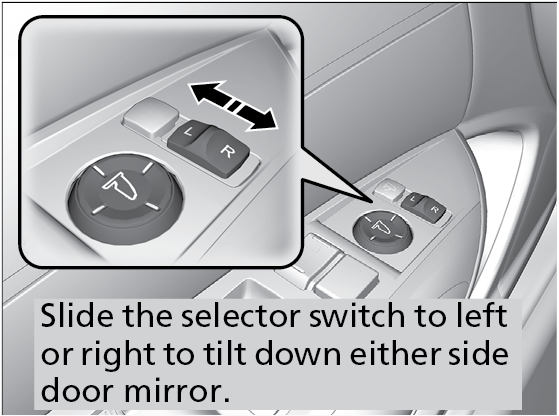
Using Mirror Control Switch
Some Nissan cars have a manual switch to adjust mirrors. This switch moves the mirror glass in small steps. It often works with a joystick or toggle control.
Switch off the reverse tilt function by using this control. Set the mirror to your preferred angle and keep it fixed.
Disabling Reverse Tilt Mechanism
You can disconnect the reverse tilt motor manually. This stops the mirror from moving when you reverse. Locate the wiring under the mirror and unplug it carefully.
Be sure to follow the car manual or ask an expert. This prevents damage and keeps safety features intact.
Credit: www.honda.ca
Frequently Asked Questions
How Do I Disable Reverse Tilt Mirrors On A Nissan?
Use the mirror control switch to adjust and turn off the reverse tilt feature manually.
Can I Stop Nissan Mirrors From Tilting When Reversing?
Yes, by changing settings in your vehicle’s mirror control panel or menu options.
Why Do Nissan Mirrors Tilt Automatically In Reverse?
Mirrors tilt to improve visibility of the curb or ground while parking or reversing.
Is It Safe To Turn Off Reverse Tilt Mirrors?
Yes, but you might lose curb view assistance when parking or reversing.
Will Turning Off Reverse Tilt Mirrors Affect Mirror Memory?
No, memory functions remain the same; only the tilt action in reverse is disabled.
Which Nissan Models Allow Turning Off Reverse Tilt Mirrors?
Most recent Nissan models with power mirrors offer this feature in their settings menu.
Conclusion
Turning off reverse tilt mirrors on your Nissan is simple and quick. Follow the steps carefully for best results. This helps prevent mirror damage and improves your driving experience. Always check your owner’s manual for model-specific instructions. Taking control of your mirror settings makes parking and reversing easier.
Keep your mirrors clean and adjusted for safety. Small changes can make a big difference on the road. Stay confident and comfortable behind the wheel.
As an Amazon Associate, I earn from qualifying purchases

